


 Cyber Awareness Training









5-MIN READ
MDR vs EDR and What Your Brisbane Business Needs
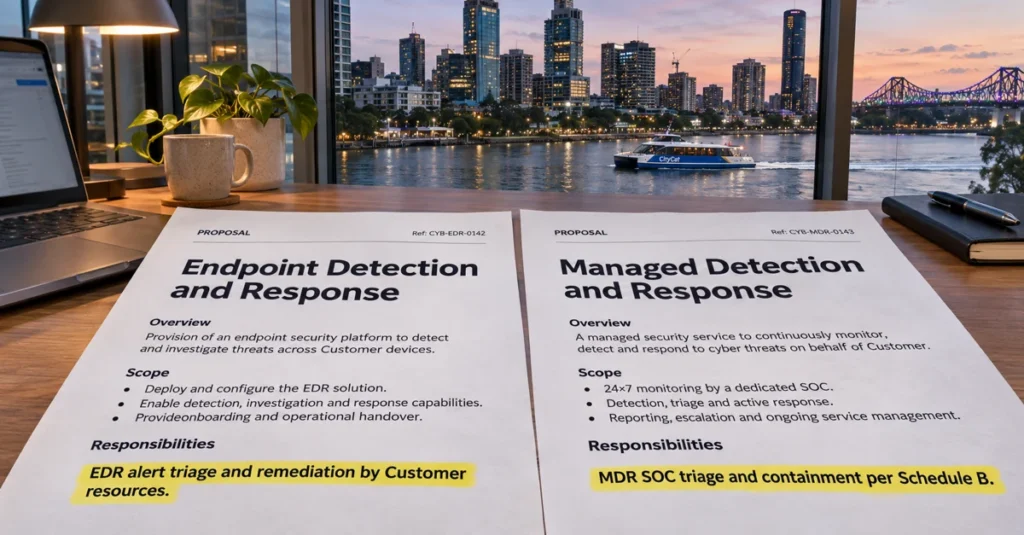
Two security proposals lie in front of you, both are written in a language you haven’t had to learn yet. One includes Endpoint Detection and Response (EDR), and the other offers Managed Detection and Response (MDR). Both promise to detect and respond to threats, and both promise to help protect your devices. You read both pages side by side, and the wording starts to blur.
You look out your office window at the CityCat skimming along the river.
“I’m not qualified for this”, you think.
Let’s make the MDR vs EDR decision easy for you.
In short, EDR is a tool your team runs to spot threats on devices, and MDR is a service where a provider's people run it for you.
You don’t need to be a security specialist to make this call, but you do need to know what each option includes and how each one changes the way your business runs day to day, down to who responds, what they can do to a device, and what stays with your team when suspicious activity shows up on your laptops and servers.
The real difference is who's watching.
So if you’re looking for cyber security services in Brisbane, let's discuss how each option fits alongside your business.
QUICK SUMMARY
MDR vs EDR is a question about who acts on the alert. EDR is the technology that monitors your devices and flags suspicious activity, and a person still has to act on it. MDR adds security analysts who investigate alerts and take the actions your agreement allows. Before you compare products, check coverage hours and response authority, since those decide what you get after hours.
What's Below
HOW DOES EDR PROTECT MY BUSINESS DAY TO DAY?
Day to day, EDR monitors your business's laptops and servers for behaviour that looks like an attack and flags it for your team. Depending on the product and setup, it can also isolate a device before a person accesses it.
EDR goes further than antivirus. Antivirus mostly blocks known threats, while EDR watches what a device does after a threat gets through. It records which programs run and what changes on each machine, so a suspicious sequence stands out.
Detection is only half the job. What EDR can do automatically depends on the product and how it's configured, and a person still has to read the alert and decide whether it matters.
HOW DOES MDR CHANGE WHAT MY TEAM HAS TO DO?
Your team hands the alert queue to a provider's analysts, who review alerts and take the actions your agreement allows. Those analysts may run on a platform you already have, or bring their own technology.
The alerts from EDR still come in. A trained analyst reads them, works out whether they’re real and decides the next step, so routine noise gets filtered before it reaches your team. Depending on the service, analysts may also hunt for threats that haven’t triggered an alert yet, then report back on what they found and what they did.
The scope is the part I'd read most closely.
Coverage hours and response authority sit in the agreement, so read that before the feature list. An MDR service doesn't automatically rebuild a damaged network or handle breach reporting.
Sophos sets out the same split in its eBook on the difference between EDR and MDR. It's worth reading alongside any proposal with a vendor's name on it.
HOW DO I WORK OUT MDR VS EDR FOR MY BUSINESS?
The biggest difference between MDR and EDR is who acts on the alert.
A patrolled Queensland beach makes this easy to see. The flags tell you where the danger is, and the rescue gear sits on the sand. The flags don’t pull a swimmer out of trouble, the lifeguards do. They read the surf, move the flags when conditions change, and use the rescue gear. EDR is the flags, which you must read and act on yourself. MDR is the patrol, which reads the surf and acts for you.
SIX FEATURES THAT SEPARATE EDR AND MDR
| Feature | EDR | MDR |
| Threat detection | Software flags suspicious activity | Analysts review and prioritise the alerts |
| Investigation | Your team, or a contractor you hire | The provider’s analysts, within scope |
| Response | Automatic or manual, depending on setup | Analyst-led or automatic, within agreed authority |
| Coverage hours | Software runs all the time, but people may not | Set by your agreement |
| Systems covered | Devices where it’s installed | Agreed systems and data sources |
| What stays with you | Running and managing the tool | Oversight and your internal contacts |
I wouldn't choose between them on the acronym alone. A business with capable security staff may run EDR well, while a business without that capacity may get more from MDR. I'd judge each proposal by what its operating arrangement delivers.
HOW DOES AN ALERT GET HANDLED AFTER HOURS FOR MY BUSINESS?
After hours, an alert goes wherever your arrangement sends it. Under EDR, that's an internal contact or a contracted escalation process. Under MDR, it's the provider's analysts, within the coverage hours in the agreement.
Say a laptop in a Brisbane office starts sending large amounts of data to an unfamiliar address overnight. The office is empty, the owner is asleep, and the alert lands in a queue.
Under EDR, the laptop may be isolated straight away, yet the investigation waits for a person. Under MDR, an analyst acts within covered hours. Outside those hours, the patrol has gone home, and the flags are effectively down, so check what the agreement says about that gap. If that laptop were mine, I’d ask these five things first.
FIVE QUESTIONS THAT DECIDE HOW THAT NIGHT GOES
- Who do I call first when an alert fires?
- Who investigates it, and when do I hear back?
- Can it be cut off without me approving it first?
- Who calls me, and in what order?
- Who restores my laptop and data afterwards?
The answers to those five questions tell you more than any feature list. Under EDR, they depend on how you’ve set things up and what your incident response planning says. Under MDR, they should be written into the agreement, so you can check them before you sign. Once you know who acts, the next question is which arrangement suits your business.
HOW DO I CHOOSE THE ARRANGEMENT THAT FITS MY BUSINESS?
A business with capable security staff may already have what it needs to run EDR well. A business without that capacity may get more from MDR, because the investigating and after-hours watch come with the service.
Company size alone shouldn't decide this. Start with your own team. Does a person on staff have the time and skill to read an endpoint alert and decide whether it matters? If no staff member has that time, I'd look at MDR before adding more tools.
WHAT 24/7 MONITORING LOOKS LIKE
A North Queensland disability support provider holds sensitive medical data under NDIS and Privacy Act rules. It needed round-the-clock monitoring and proof it had taken reasonable steps.
With its long-standing technology partner, it hardened EDR on its devices, added 24/7 threat monitoring and wrote down its recovery and breach steps. Its teams gained confidence, and it now has evidence to show regulators and insurers.
Next, look at what you already pay for. If you have existing managed IT support, ask that provider where its responsibilities end and the security service begins. Overlapping subscriptions can add cost without adding much protection.
HOW DO I CHECK A PROPOSAL BEFORE I PAY FOR MORE COVERAGE?
Start with what you already have, then check the coverage hours, response authority and escalation path in the proposal before you sign anything else.
So once I know my baseline, I ask which products and services the proposal includes, and whether it runs on my current platform and licence, with any migration work priced in. I check which endpoints and accounts are watched, and whether other systems are covered too. I get the coverage hours in writing, including weekends and public holidays, and I ask what happens when the patrol goes home. Next, I ask what the provider can do to a device without checking with me first, and who has approved those actions. Last, I confirm who gets the call, and I ask whether recovery and specialist investigation are priced separately.
Once those answers sit in writing, your shoulders can drop. The proposal stops being a sales document and becomes a document you can compare line by line.
SUMMARY
MDR vs EDR comes down to who reads the water. EDR gives your team the technology to detect and respond, and it works best where a person is ready to investigate. MDR adds analysts who review alerts and act within agreed limits, which suits a business without that capacity in-house.
Either way, the proposal only tells you so much. Coverage hours, response authority and the escalation path sit in the agreement, so read those before you sign.
Unsure who monitors and responds to your security alerts? Explore ADITS' cyber security services in Brisbane and discuss your current protection and support arrangements.
FREQUENTLY ASKED QUESTIONS
CAN MDR USE THE EDR SOFTWARE I ALREADY HAVE?
Some providers build around existing EDR tools, so your licence may carry over. Others bring their own product, which means new software on every device and a move of your alert history, so get that migration work into the quote.
DOES MDR INCLUDE RESTORING SYSTEMS AFTER AN ATTACK?
Containment stops an attack from spreading. Recovery is a different job.
Recovery means rebuilding a laptop, restoring data from backups and making sure no attacker still has access. It can sit under a different contract, so ask which recovery steps are included and what the rest would cost. Check that your backups are tested and kept apart from the systems an attacker could reach.
DOES HAVING ANTIVIRUS MEAN I ALREADY HAVE EDR?
Antivirus mostly blocks known threats at the door, while EDR watches what a device does after a threat gets through, which helps it spot new behaviour. Some packages include both, while others offer a basic set of EDR features with limits on monitoring or response. The package name won't tell you which you have, so check the product list, the licence tier and whether those features are switched on across all your devices.
CAN I KEEP MY CURRENT IT PROVIDER WHEN I ADD MDR?
Your IT provider and the MDR service may both have access to the same devices. Agree in writing who handles access changes, who escalates an alert, who isolates a device and who leads recovery. A clear handover stops two teams from acting on the same laptop at the same time.
Most Popular
-

Is It Time to Start Outsourcing Cyber Security for Your Business?
-

How to Choose a Managed IT Security Provider in Cairns
-

Cyber Security Services That Protect Your Nonprofit’s Data like a Reef
-

Professional Cyber Security Services for Brisbane & Townsville Businesses
-
What Are Cyber Security Tools? 10 Essential Types Every Company Should Know
-
Why Is Cyber Security Important? Protecting Your Business in a Digital World



Stay up to date
Subscribe to our newsletter for IT news, case studies and promotions