man-holding-tablet-with-matrix-animation

Smarter Workflows with Microsoft Copilot

Smart tools that make businesses more productive, creative, and streamline decision-making. Microsoft Copilot puts AI right into your daily tasks, making it easier for your teams to work smarter and get more done with less effort. With the right help, you can make sure that Copilot becomes a valuable tool for your whole company, boosting productivity, creativity, and real results. 

Free Consultation

Trusted by Industry Leaders

MICAH Projects
Centacare North Queensland
selectability
Norco
AMRRIC

Copilot makes everything you do a bit easier

How This AI-Powered Tool Steps in to Support Your Workflow

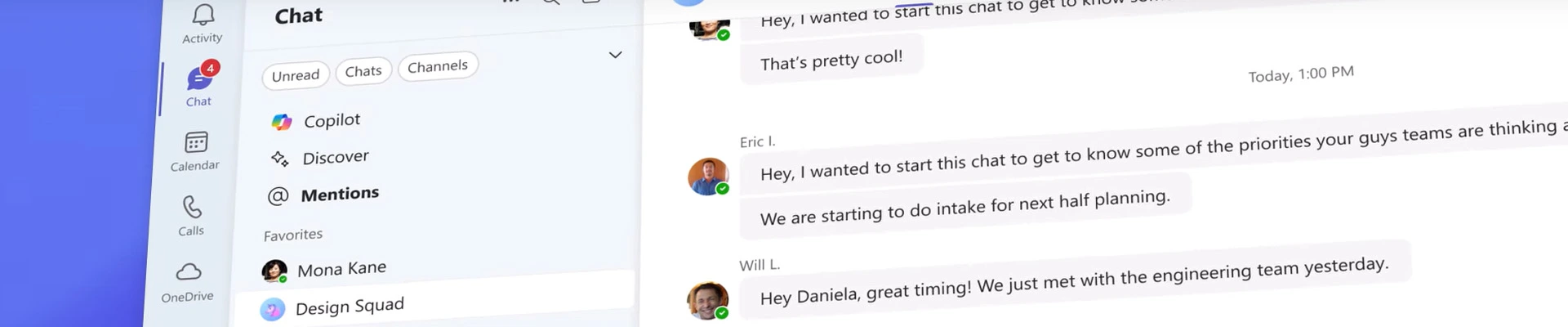
Microsoft Copilot is an AI-powered tool that’s built right into Microsoft Office programmes like Word, Outlook, Teams, PowerPoint, and Excel. Using natural language prompts, it helps people write content, summarise information, analyse data, automate chores, and get more done.

Your company can use Copilot to finish work that would usually take hours without having to switch between apps or do the same things over and over again. The best thing about Copilot is that it can use the documents, emails, messages, meetings, and other data that your company already has in Microsoft 365 to give you these features while still following the security and permissions settings you already have in place.
Copilot logo

How Copilot Makes Your Day a Little Easier

speedometert icon Fast track your tasks

Use prompts to quickly create drafts, summaries, emails, and even presentations. This will help you get from concept to action in a fraction of the time. Copilot takes care of the busy work so you can focus on what really matters.

like icon Decide sooner

Get insights from emails, papers, and data right away without having to manually look them over. Copilot highlights what matters most, giving you the clarity to make informed decisions without the delay.

shakehands icon Work together better

Teams will automatically send you meeting notes, action items, and summaries. With less time spent recapping, you can keep projects moving smoothly and maintain momentum across every conversation.

cog icon Cut down on manual work

You can get extra time in the day by automating tedious tasks like formatting, organising, or compiling data. With Copilot, the little things are taken care of automatically, so you can focus on the important work.

network icon Make the most of Microsoft 365

Bring AI into the products your team already uses, like Word, Excel, Outlook, and Teams, to improve daily workflows. Copilot improves these apps, allowing your company to get even more value from its existing ecosystem.

AI That Fits the Way Your Industry Works

No two industries work in the same way, and neither should your AI tool. Whether you're helping communities, caring for patients, or educating students, Copilot can change to fit your specific needs.

NFP

Using Smart Tools to Help Your Cause

NFPs generally have to deal with a lot of different stakeholders, limited resources, and complicated reporting rules. Copilot can aid by:

  • Using past applications or data from the organisation to automatically write grant applications

  • Summarising donor communication and helping staff decide which follow-ups are most important

  • Analysing programme data to make board or impact reports

  • Making campaign briefs based on past marketing materials

  • Putting together input from volunteers that came in through forms, emails, and documentation

Copilot lets NFP teams focus on strategy and making a difference in the community instead of doing paperwork.

Education

Enhancing Learning Experiences With AI Driven Support

Teachers and administrators have a lot on their plate, such organising lesson plans and talking to students and parents. Copilot helps educators by:

  • Generating drafts of lesson plans based on what is in the curriculum

  • Summarising useful insights out of student performance data

  • Making PowerPoint slides for classes in only a few seconds

  • Helping create messages to parents that have the same tone and message every time

  • Taking notes and summarising student meetings so that follow-up is correct

With Copilot, schools can cut down on time-consuming administrative tasks and put more emphasis on learning results.

Healthcare

Improving Care Delivery with AI That Works in the Background

Healthcare providers work in fast-paced, compliance-driven settings where being accurate and efficient is important. Copilot helps by:

  • Summarising what patients say while keeping the clinical context

  • Writing reports for the leadership or operational teams within the company

  • Making policy or procedure documents based on existent data

  • Getting information from big databases, like the number of appointments or the use of services

  • Helping to design training materials for new employees or for clinical onboarding

Copilot helps healthcare teams keep providing high-quality care while making administrative tasks less stressful.

Ready for AI? Your Data might want a Quick Check-In First

While Copilot is incredibly powerful, its effectiveness relies heavily on how well your organisation manages data, permissions, and Microsoft 365 configurations. For AI to perform safely and accurately, the right people must have access to the right information—and your environment needs to be properly structured and governed.

recommendation-circle

At ADITS, we prioritise Copilot adoption for our managed clients because we already understand their industry and operational needs. This allows us to deploy Copilot in a way that is safe, strategic, and genuinely beneficial across the organisation.

What's the difference

Copilot Free vs. Microsoft 365 Premium

copilot-logo-only

COPILOT Free

copilot-logo-m365

Microsoft 365 Copilot

Access Point

Available online or via the app

Embedded within Microsoft 365 apps like Word, Excel, Outlook, Teams and more

User Experience

General-purpose AI assistant for web-based tasks

AI assistant integrated into each Microsoft 365 app

AI Agents

Basic SharePoint agents for all Microsoft users

Advanced agents such as Researcher and Analyst, along with other pre-built agents

AI Capabilities

Chat-based interactions, web search, summary tools via web app or mobile app

Deep integration with documents, emails, spreadsheets, calendars etc., including advanced analytics to measure ROI

Subscription Requirement

Free to use with limited features

Requires a Microsoft 365 subscription

Copilot Free
Access Point Available online or via the app
User Experience General-purpose AI assistant for web-based tasks
AI Agents Basic SharePoint agents for all Microsoft users
AI Capabilities Chat-based interactions, web search, summary tools via web app or mobile app
Subscription Requirement Free to use with limited features
Microsoft 365 Copilot
Access Point Embedded within Microsoft 365 apps like Word, Excel, Outlook, Teams and more
User Experience AI assistant integrated into each Microsoft 365 app
AI Agents Advanced agents such as Researcher and Analyst, along with other pre-built agents
AI Capabilities Deep integration with documents, emails, spreadsheets, calendars etc., including advanced analytics to measure ROI
Subscription Requirement Requires a Microsoft 365 subscription

Microsoft Hub

adits-team-member-photo

Leverage the Power of Copilot

Boost productivity, enhance collaboration, and secure your data. Let's chat about your business goals and technology needs!

Frequently Asked Questions

  • Do I need special licensing to use Copilot?

    Yes, Copilot needs a special Microsoft 365 licencing add-on. Before it can be used, your company must also meet several technical and security standards. ADITS can help current clients figure out what kind of licence they require.

  • Is Copilot secure?

    Yes, Copilot uses the same security, privacy, and compliance measures that are currently in place in Microsoft 365. It simply lets your team see the data that they currently have authorisation to see, based on your current rights and governance settings.

  • Can Copilot see all my data?

    No, Copilot only uses content that you have access to in Microsoft 365. It does not change permissions, disclose prohibited files, or access sensitive data outside your current security strategy.

  • Can ADITS help us set up Copilot?

    ADITS offers Copilot guidance and assistance to existing managed clients, assuring proper data governance, security posture, and Microsoft 365 configuration before enabling AI.

Empower today. Strengthen tomorrow.

Explore Other Business Technology Services

The ADITS Difference

Navigate the complexities of technology with ease. ADITS makes tech talk straightforward and transparent, giving you clarity and control in every conversation.

  • Understanding Beyond Business

    At ADITS, we go beyond transactions. We listen to your story and align our IT business solutions to support your mission, growth, and strategic direction.

  • Tech Talk Made Simple

    We cut through complexity by delivering managed IT solutions that are transparent, straightforward, and designed to keep you in control without unnecessary jargon.

  • Embracing Change, Leading Innovation

    Always learning and evolving, we ensure your business is equipped with the latest strategies, staying ahead in a rapidly changing tech landscape.

  • Supporting 850+ Business across Queensland
  • Over 50 Passionate Experts on our Team
  • 14,000+ users across Queensland
  • 96% customer satisfaction
  • Understanding Beyond Business

    At ADITS, we go beyond transactions. We listen to your story and align our IT business solutions to support your mission, growth, and strategic direction.

  • Tech Talk Made Simple

    We cut through complexity by delivering managed IT solutions that are transparent, straightforward, and designed to keep you in control without unnecessary jargon.

  • Embracing Change, Leading Innovation

    Always learning and evolving, we ensure your business is equipped with the latest strategies, staying ahead in a rapidly changing tech landscape.