Top 6 Common IT Disasters and How to Prepare for Them

IT disasters don’t always strike after a warning. And they can also come in a variety of forms, some of which you may not be expecting. For instance, IT disasters range from cyber attacks to server crashes, or even simple software updates that go wrong. 

Understanding what counts as an IT disaster and the fundamentals of IT disaster recovery planning is the first step toward protecting your business from costly downtime, data loss and reputational harm. 

Let’s explore the most common types of IT disasters  – and more importantly, how to prevent them with practical strategies to keep your systems running and data protected. 

Common IT disasters (and preparation solutions)  

1. Data Breaches and Cyber attacks

No business is immune to cyber threats. From targeted ransomware attacks to broad phishing scam, data breaches can compromise sensitive information, disrupt operations and damage your organisation’s reputation overnight. For smart businesses, it’s not a question of preparing for “if”, but “when” a cyber incident will occur. 

Solution: Strengthen Your Cyber Defences 

The best defence is a layered one. Implement multi-factor authentication (MFA), endpoint protection and email filtering. Regularly update software and patch vulnerabilities as soon as they’re identified.  

Don’t forget to test your incident response plan regularly so your team knows exactly what to do in the event of an attack.

2. Hardware Failures

Even the most robust infrastructure can experience physical breakdowns. Hard drives crash, servers overheat and aging equipment can give out with little warning – which can bring operations to a grinding halt. For organisations without a backup plan, the consequences can be severe. 

Solution: Backup, Monitor and Replace Proactively 

Start with a clear asset management strategy: know what hardware you have, where it is in its lifecycle and when it should be replaced. Set up hardware monitoring tools to catch issues early, and ensure your backups (whether on-premises or in the cloud) are automatic, occur regularly and are tested. Also, make sure your Business Continuity Plan is up-to-date and includes procedures for handling critical hardware failures. This ensures your team knows how to maintain operations, even if key systems go down. That way, even if something breaks, your data won’t disappear with it.

3. Software Glitches and Updates Gone Wrong

Routine software updates can sometimes do more harm than good. Sometimes, they can cause unexpected bugs, downtime or system incompatibilities. These issues can interrupt workflows or expose vulnerabilities if not handled properly. 

Solution: Test Before You Deploy 

Always test updates in a controlled environment before rolling them out widely. Maintain version control so you can quickly revert if something breaks. Where possible, schedule updates outside of business hours and notify staff in advance. A structured update process helps minimise disruption and avoid unpleasant surprises.

4. Human Error

Mistakes happen. Team members may unintentionally delete files, or click on malicious links. Human error remains one of the leading causes of IT incidents across all industries. 

Solution: Build a Safety Net Around Your People 

Invest in regular staff training for cyber awareness and safe IT practices. Limit access to sensitive systems based on roles and implement approval workflows for critical changes. Automated alerts and safeguards can catch errors early, reducing the risk of one slip-up turning into a major disruption.

5. Third-Party Service Failures

Relying on external vendors for cloud storage, communications or payments can introduce an element of risk. If a key provider experiences downtime or a breach, your business may be left in the dark, with little control over the outcome. 

Solution: Plan for Vendor Contingencies 

Always review the service level agreements (SLAs) for third-party providers. Build redundancy where possible. For example, by having a secondary internet provider or backup communication tools.  

Incorporate third-party risk management into your IT strategy by assessing the potential impact of each vendor on your operations, especially those with access to sensitive systems or data. A formal vendor risk assessment can help you identify weak points, support compliance and make more informed choices when selecting service providers.  

Include vendor outages in your disaster recovery plan, so you know how to respond if a service you depend on goes offline. 

6. Insider Threats

Not all risks come from outside your organisation. Disgruntled employees, careless contractors or those with malicious intent can cause data leaks, sabotage or theft – often bypassing external security measures. While it can be an unpleasant thought to consider these risks, preparing for these type of IT disasters before they happen is the best way to protect your business. 

Solution: Monitor and Manage Internal Risks 

Implement strict access controls, regularly review user permissions and monitor for unusual activity. Establish clear offboarding procedures to revoke access immediately when someone leaves. Promoting a positive workplace culture can also reduce the risk of insider threats. 

While no business can completely eliminate the risk of IT disasters, a proactive approach to prevention and recovery makes all the difference. Developing a robust disaster recovery strategy involves understanding your organisation’s unique risks, implementing strong safeguards and regularly testing your plans to ensure they work when it counts. 

Follow the essential steps to prepare and protect your business by understanding different types of disaster recovery solutions and having a robust disaster recovery strategy. Taking action now can save you time, money and stress in the future. 

Don’t wait for disaster to strike. Explore tailored disaster recovery solutions to safeguard your business and keep your operations running smoothly, no matter what comes your way.

What Is IT Disaster Recovery? Everything You Need To Know For Your Business

The moment disaster strikes is never the time to start preparing. Studies show that 60% of businesses without a disaster recovery plan never fully recover from a major disruption, underscoring the need for proactive planning.

Although this statistic is concerning, there are proactive strategies to protect your business from the fallout of disasters. A disaster recovery plan is one such strategy, offering a clear roadmap to help your business bounce back quickly.

In this comprehensive guide, we’ll cover all aspects of IT disaster recovery planning, highlighting key features and demonstrating how they ensure business continuity during disruptions.


What is IT disaster recovery?

At its core, IT disaster recovery refers to a structured approach that helps businesses resume normal operations after unexpected disruptions to their IT infrastructure. These disruptions can take many forms, including natural disasters, cyberattacks, system failures, or even human errors.

The primary goal of IT disaster recovery is to restore critical systems and data as quickly as possible. Doing so helps minimise downtime, which is one of the biggest financial risks businesses face during a crisis. For example, imagine your company suddenly loses access to customer data – every second counts when trying to get back online.

A well-structured disaster recovery plan serves as your detailed playbook for handling IT emergencies with precision. It outlines every detail – from who’s responsible for each task during a disaster to the specific tools, technologies, and resources needed for recovery. This can help prepare your business to handle everything from minor server issues to major system outages.  


What events qualify as disasters?

Disasters can take many different forms. In the context of IT and business operations, however, they typically involve events that disrupt or damage critical systems or infrastructure. These events are categorised into natural, technical, and human-made disasters – let’s take a closer look:

1. Natural disasters

In the context of IT, natural disasters refer to environmental events that cause major damage to physical infrastructure and disrupt business operations. Some common examples include:

  • Earthquakes: These powerful seismic events can cause widespread structural damage, collapsing buildings, damaging data centres, and destroying essential IT equipment. The physical impact of an earthquake can also sever network connections.
  • Floods: Flooding can cause severe damage to hardware, servers, and critical infrastructure, particularly in areas prone to heavy rain or poor drainage systems. Water can seep into server rooms, short-circuit electrical systems, and destroy valuable data, potentially causing long-term business disruptions.
  • Fires: Both wildfires and fires within buildings or data centres can completely destroy IT systems and equipment. Beyond the immediate damage to hardware, the resulting smoke and heat can also damage electrical components.
  • Hurricanes and tornadoes: These violent storms can cause widespread destruction by knocking out power supplies, flooding facilities, and severely damaging buildings and infrastructure.
  • Lightning strikes: A direct lightning strike can severely damage electronic equipment and servers, particularly when it leads to power surges. These surges can overwhelm unprotected systems, causing irreparable damage to sensitive hardware and loss of critical data.

2. Cyber security incidents

Cyberattacks have become one of the most prominent threats to businesses in recent years. These threats can compromise data, systems, and networks, causing severe disruptions. Key cyber security events include:

  • Data breaches: A data breach occurs when unauthorised individuals gain access to sensitive business information like financial records or customer data. This can lead to the exposure of confidential information, damaging a company’s reputation and potentially causing financial loss.
  • Ransomware attacks: Ransomware is a form of malicious software that locks or encrypts critical data, making it inaccessible to its rightful owners. These attacks can bring operations to a complete halt, causing significant financial losses, especially if businesses are forced to pay the ransom.
  • Malware infections: Malware is malicious software created to damage, disable, or disrupt the normal operation of computers, servers, or networks. The consequences of a malware infection can be severe, leading to data loss, prolonged system downtime, and costly recovery efforts.

3. Hardware and software failures

Sometimes, disasters are caused by technical failures in critical IT systems or infrastructure. While these failures may not be caused by external events, they can be equally devastating:

  • Server failures: Server failures occur when key servers that support business-critical systems malfunction or crash. Without proper backup systems in place, businesses may experience prolonged downtime, unable to access vital applications, websites, or databases.
  • Data loss or corruption: Data loss or corruption happens when crucial business information stored in databases or file storage systems becomes damaged, inaccessible, or permanently lost. In industries where data is a primary asset, this loss or corruption can cause major compliance violations and operational disruptions.
  • Network outages: Network outages occur when disruptions in the connectivity infrastructure prevent access to critical business systems and data. These power outages can delay business communications and interrupt workflows.

4. Human errors

Whether due to mistakes or lack of training, human error can play a large factor in many disasters. For instance, alarming research indicates that human error accounts for 74% of data breaches. These events can be just as harmful as natural or cyber disasters:

  • Accidental data deletion: This occurs when employees unintentionally delete or overwrite important files, leading to the loss of crucial business information. Accidental data deletion can leave a major impact on business operations, creating drawn-out downtime, delaying projects, and disrupting customer service.
  • Improper configuration: Improper configuration refers to errors made when setting up systems, networks, or security protocols. Misconfiguring systems or networks can quickly lead to vulnerabilities, security breaches, or loss of access to critical systems.
  • Unintentional exposure: Unintentional exposure happens when data or systems are accidentally made accessible to unauthorised individuals due to human error or oversight. Such exposure not only jeopardises data privacy, but can also lead to legal issues, financial penalties, and a damaged reputation.
  •  


What makes IT disaster recovery essential for businesses?

In today’s tech-driven world, IT systems are the foundation of nearly all business operations. While no one wants to think about potential disruptions or disasters, the reality is that they can happen at any time, and if they do, they can bring operations to a halt.

For this reason, it’s essential for businesses to implement an IT disaster recovery plan to protect their operations, stay prepared for any disaster scenario, and ensure a swift return to normalcy.

Let’s explore four compelling reasons why incorporating a strong disaster recovery strategy is essential for helping your business handle unexpected disasters with minimal disruption:

1. Business continuity

The longer it takes to get back on track after a disaster, the bigger the impact on your bottom line. Whether it’s losing access to key systems, applications, or even the internet, disruptions can leave employees unproductive and customers frustrated.

However, even in the face of crises, with a solid disaster plan in place, businesses can make sure that their vital functions like customer service and production continue with minimal disruption, keeping employees on track and customers satisfied.

A well-executed recovery plan ensures business continuity, allowing companies to regain their footing and maintain operations without long-lasting setbacks.

2. Data protection

Data is the driving force behind today’s digital business world. From customer information to financial records and intellectual property, businesses rely heavily on data to drive decision-making.

In the wake of a natural disaster, hardware failure, or some other kind of disruptive event, businesses can lose valuable data. This is where a disaster recovery plan shines, offering a clear, step-by-step process to restore your data and recover with little to no hassle.

What’s more, IT disaster recovery strategies often also include regular backups, which involve making copies of data and storing them in secure locations. This gives businesses the guarantee that, if something goes wrong – like a system failure or data corruption – they can quickly access backed-up information.

3. Risk mitigation

Businesses without an IT disaster recovery plan face exposure to the full impact of disasters and threats. After a disaster hits, what starts as a temporary disruption can quickly escalate into lasting harm.

When caught off guard, the consequences for businesses can be severe, with crippled infrastructure, inoperable systems, and compromised data ranking among the most devastating.

The impact doesn’t stop there. These challenges can create a ripple effect, eroding customer trust and straining important relationships. All of this can leave under-prepared businesses in a dire financial position that may take months, or even years, to fully recover from.

An IT disaster recovery plan facilitates businesses to tackle these challenges head-on. For example, a plan might include a maintenance guide to help businesses keep their vital systems updated and in peak condition. It could also outline strategies for setting up temporary infrastructure, such as cloud-based systems, to maintain operations while repairs are underway.

By proactively identifying vulnerabilities and implementing solutions, an IT disaster recovery plan serves as your safety net, enabling your business to mitigate risks even in the face of adversity.

4. Regulatory compliance

Along with the numerous benefits we’ve highlighted so far, an IT disaster recovery plan is also a legal requirement in many industries. Sectors like healthcare, finance, and legal are often subject to strict regulations regarding data protection and disaster recovery.

The reason for this is largely to ensure that businesses have disaster recovery plans in place to protect sensitive customer data and keep operations afloat during a disruption. Failure to comply with these regulations can result in hefty fines and legal penalties for businesses.

A comprehensive IT disaster recovery plan helps businesses meet these obligations by ensuring they have the correct procedures to protect and recover data. Having this in place also demonstrates to regulators – and customers – that your business is serious about safeguarding information.  


What are the main features of a disaster recovery plan?

By combining proactive strategies, robust tools, and clear communication, a solid recovery plan provides the confidence to weather any crisis and emerge stronger. Below, we’ll explore the five core features that make up an effective disaster recovery plan:

1. Clear recovery objectives

A key part of any disaster recovery plan is the establishment of Recovery Time Objectives (RTO) and Recovery Point Objectives (RPO). These two metrics are responsible for defining how quickly and effectively your business can recover from a disaster, along with how much data loss is manageable during the recovery process.

Recovery Time Objectives (RTO): Your RTO is the precise amount of time your business can afford to be down after a disaster. It sets the target time needed to restore business functions.

For example, if a business depends on its online store, and its website crashes, the RTO might be set to 2 hours. This means the business must aim to get the website back online within 2 hours to avoid losing sales or frustrating customers.

Recovery Point Objective (RTO): The RPO determines the maximum amount of data loss your business can tolerate in the event of a disaster. It helps you decide how frequently to back up your data, to ensure that, if disaster hits, the data you lose does not jeopardise your operations.

For example, a financial firm might set its RPO to 30 minutes. This means it will back up critical data like transaction records and account balances every 30 minutes. This way, if a disaster occurs, no more than 30 minutes of financial data would be lost, helping ensure minimal disruption for the firm.

2. Data backup and recovery systems

A key component of any disaster recovery plan is having robust data backup and recovery systems in place. Storing copies of your critical data in multiple, secure locations – whether through cloud-based storage or off-site backups – ensures quick recovery in the face of disaster.

Cloud solutions with real-time replication play a crucial role in this process. This technology provides a powerful way to continuously update and protect your data, with every data change immediately reflected in your backup.

This means that as soon as data is created or modified, it’s instantly replicated to a secure, off-site location. For example, if you experience a cyber attack or server failure, you can restore the most recent version of your data in a matter of minutes.

The benefit here is that your business is always prepared for a quick recovery, regardless of when or how disaster strikes. For example, if your business faces a cyberattack or server failure, you can quickly restore the most recent version of your data within minutes.

3. Business continuity procedures

A comprehensive disaster recovery plan doesn’t just focus on restoring data. It also includes the necessary steps to keep major business functions running during a disruption.

For example, your recovery plan might include details for setting up remote workstations for employees if the office becomes inaccessible or arranging for a third-party vendor to handle essential customer support during system outages.

The goal is to ensure that, regardless of the situation, critical services can continue uninterrupted.

4. Communication plans

In the context of a disaster recovery plan (DRP), a communication plan plays a crucial role in making sure everyone is on the same page during a disruption. While the disaster recovery plan focuses on getting systems back up and running, the goal of a communication plan is to keep employees and key stakeholders informed throughout the process.

For instance, if a network outage occurs, the IT department might use internal communication tools to alert employees, provide system updates, and offer alternative work methods during the downtime.

Incorporating a clear communication strategy into your recovery plan ensures that everyone knows what’s happening, what actions to take, and how to stay connected during the recovery process.

5. Testing and regular updates

New risks, emerging technologies, and evolving business needs can arise at any time, which is why a disaster recovery plan must be consistently tested and updated to stay relevant and effective.

For this reason, regular simulations are a crucial component of a recovery plan, allowing businesses to assess its effectiveness and identify any gaps or weaknesses. These simulations replicate real disaster scenarios, providing valuable insights into how well the plan performs under pressure.

For example, testing a failover process – the procedure for switching to a backup system – can reveal if any system, network, or backup process needs adjusting to recover quicker. Regularly refining this process helps make sure that recovery efforts run smoothly.  


How ADITS helps you build a bulletproof disaster recovery plan

Given the importance of disaster recovery strategies for businesses, having a well-thought-out and dependable plan is essential. This is where ADITS provides invaluable support.

Leveraging years of experience in disaster recovery planning, ADITS works closely with businesses to build tailored solutions that meet their unique operational needs.

Here’s how ADITS’ disaster recovery services can support your business:

  • Tailored recovery strategies: ADITS creates customised disaster recovery plans tailored to the unique needs of your business. For example, if your business relies on real-time transactions, ADITS can prioritise recovery protocols to restore critical systems within hours.
  • Secure and accessible backups: With cloud-based and hybrid backup solutions, ADITS safeguards your data, making it readily available when you need it most.
  • Continuous data protection: Real-time data replication to keep your systems current and secure, safeguarding the latest information and making it immediately restorable in the event of a disaster.
  • Seamless failover solutions: ADITS implements and rigorously tests failover processes to guarantee smooth transitions during outages.
  • Proactive testing and updates: With ADITS, your business receives regular simulations and updates to keep your recovery plan ahead of emerging risks and technological advancements.
  • 24/7 monitoring and support: Around-the-clock system monitoring allows ADITS to detect and address potential issues promptly. For example, if a server anomaly occurs at 2 a.m., our team can address it immediately, ensuring the problem is resolved before it impacts operations during peak business hours.


Prepare your business for the unexpected with ADITS

A robust disaster recovery plan is your business’s first line of defence against unexpected disruptions.

At ADITS, we specialise in crafting IT disaster recovery plans that protect your business from unexpected disruptions. We take the time to understand your operations, identify potential vulnerabilities, and develop a detailed strategy to ensure your business remains up and running, no matter the challenge.

To learn more, take a look at our IT disaster recovery solutions and receive a free quote. Let’s collaborate to create a resilient recovery plan that safeguards the future of your business.

DISCOVER OUR SERVICES  

5 Steps to Develop a Robust Disaster Recovery Strategy

Many organisations and communities were impacted by tropical cyclones last summer with 3,086 in Queensland alone. Such disasters underscore the importance of preparedness to bounce back faster. They are also opportunities to develop and refine disaster recovery strategies, so businesses can better handle future disruptions.


Why You Need a Disaster Recovery Strategy

With a well-crafted disaster recovery plan, Brisbane and Townsville businesses can quickly restore critical operations, minimise downtime, and build customer trust. Preparing ahead also helps to safeguard assets, protect data, and ensure business continuity.

In addition, having a robust plan in place can enhance your business’ reputation, especially in terms of reliability and resilience. This can give you a competitive edge in the market.

The ability to quickly respond to and recover from disasters can be a game-changer. So, how do you build a disaster recovery plan?

1. Conduct a Risk Assessment

Begin by identifying potential threats that could impact your business, such as:

  • Natural disasters like cyclones, floods, and bushfires
  • Operational risks like supply chain disruptions and cyber security threats

By listing all possible threats, you can start to understand the scope of what you need to prepare for. Then, evaluate how each threat could affect your critical business functions. Think about the worst-case scenarios and the potential downtime. Prioritise risks based on their likelihood and severity, so you can focus on the most significant threats first. This can help you allocate resources better and ensure that your most critical functions are safe.

2. Craft a Business Impact Analysis (BIA)

A Business Impact Analysis (BIA) is key to understanding the effects of disruptions on your operations. Which functions are vital? For example, if you run an e-commerce site, payment processing system is critical.

Determine the Recovery Time Objectives (RTO) and Recovery Point Objectives (RPO) for each critical function. This will help you see how quickly you need to restore these functions and how much data loss is acceptable.

Knowing the dependencies between different systems and processes is also important. For instance, your customer service operations might depend on your IT infrastructure.

Another vital step is assessing the financial impact of downtime. Calculate the potential revenue loss, increased costs, and any fines or penalties you might incur. This can reveal the true cost of a disruption and justify the investment in disaster recovery measures.

3. Develop a Disaster Recovery Plan

Based on your risk assessment and BIA, you can now develop a comprehensive disaster recovery plan, including detailed procedures for:

  • Incident response and notification
  • Data backup and recovery
  • System restoration
  • Business continuity
  • Crisis communication

Assign roles and responsibilities to ensure everyone knows what is expected of them in the event of a crisis.

Regularly testing the plan helps identify any weaknesses. For example, you could conduct a simulation of a cyberattack to reveal gaps in your response procedures. Then, use the test results to make necessary adjustments to the plan.

Additionally, consider the cost and benefits of different disaster recovery solutions. For example, consider investing in cloud-based backup solutions if that would offer better value and flexibility compared to traditional on-site backups.

4. Test and Maintain the Plan

A disaster recovery plan requires ongoing testing and maintenance to ensure its effectiveness. Try various ways to test it, such as simulations, drills, and tabletop exercises. Update the plan as your organisation or technology changes, such as when you adopt new software or move to a new office.

Our podcast Fail Fast, Recover Faster: Lessons from the CrowdStrike Outage goes through the topic of business resilience in detail and provides tips on how often businesses should update their disaster recovery plan. Watch it now!

5. Educate Your Team

Start by developing clear training materials that outline the plan in detail, including step-by-step procedures and contact information for key personnel. Conduct regular training sessions, where you can:

  • Use real-life scenarios to make the training engaging and relevant
  • Simulate disaster scenarios to identify any weaknesses in the plan
  • Leverage technology and tools that can make training more effective
  • Encourage feedback and participation, to keep improving the plan and to foster a culture of preparedness

  • Recognise employees who actively participate in training, to reinforce its value and encourage engagement
  • Provide regular updates and refresher courses, to keep everyone informed and up-to-date


Bounce Back Faster

Developing a robust disaster recovery strategy is crucial for business resilience. Following the above steps can help you ensure your business is prepared to handle any disasters, and can recover quickly.


Remember: We can’t avoid disasters, but we can mitigate their impact. Start today by exploring our IT disaster recovery services:

Disaster-Recovery-Strategies-Email-Banner

4 Key Benefits of Cloud Backup for Healthcare You Can’t Ignore

In April 2024, MediSecure, an Australian electronic prescription provider, experienced a significant ransomware attack that compromised the personal data of approximately 12.9 million Australians

The stolen data included sensitive information such as full names, phone numbers, addresses, Medicare numbers and prescription details. 

This breach offers a stark reminder of just how vulnerable healthcare IT systems can be. With patient data on the line, having a reliable cloud backup for healthcare in place has never been more critical. This is why it’s vital for healthcare providers to understand the full benefits of club backups.

Why cloud backup matters

Cloud backup for healthcare is much more than a safety net. It’s an absolutely necessary part of any healthcare organisation’s cyber security strategy. They help prevent the kind of large-scale data loss seen in breaches like MediSecure by keeping sensitive patient information secure and accessible.

Beyond security, reliable cloud backups mean healthcare providers can access the data they need. And when they need it. For instance, the Australian Digital Health Agency notes that 80% of health consumers expect innovative digital tools to enhance their care, and having data at your fingertips is a big part of delivering that experience.

Despite this, some practices still rely on local servers or physical backups, which are far more vulnerable to unexpected events. And while Microsoft 365 offers built-in backup features, they don’t cover everything—as we explore in our article, Why Microsoft 365’s Built-In Backup Isn’t Enough.

In short, cloud backups for healthcare have become standard for a reason. Here are four ways they can transform the way your practice protects and manages patient data:

  1. Better patient care, every time

‘Good collection and use of health data leads to better health care,’ says the Department of Health and Aged Care. And it’s easy to see why. When a doctor can’t access a patient’s full medical history because of a server outage or other technology disruption, care can be delayed or even compromised.

While on-premise servers are still important for running critical applications, pairing them with cloud backups takes your data security—and patient care—to the next level.

For example, with cloud backups, healthcare professionals can securely store patient records and gain 24/7 access to them from anywhere with an internet connection.

That means doctors and nurses can access the information they need instantly, even during unexpected events. 

So how do cloud backups actually improve patient care? By giving healthcare teams faster, reliable access to records, they can diagnose sooner, plan treatments more efficiently, and deliver better outcomes for every patient.

 2. Faster recovery and minimal downtime

No IT system is completely immune to surprises. Whether it’s a power outage, a natural disaster or a cyberattack, the unexpected can hit when we least expect. 

Imagine a cyclone, for example, hitting and taking your practice’s servers offline. In an unanticipated event like this, how quickly could you access patient records and get back to caring for patients?

Downtime in healthcare is a lot more than a mere convenience. It can affect patient safety and cost your practice thousands for every minute offline. The longer the disruption, the bigger the impact. Basically, the longer the disruption, the bigger the impact. 

And that’s where cloud backups make a real difference. With data stored securely off-site, you can recover quickly and keep your practice running smoothly. 

The Australian Government advises healthcare providers that ‘having a recent backup of your data will help you to recover more quickly,’ reinforcing why offsite solutions are essential for continuity of care.

 3. Stay compliant and protect patient data

Patient data is incredibly sensitive. And the healthcare sector is under constant pressure to meet strict regulations. 

The World Economic Forum stresses that ‘stringent rules and regulations must be put in place to secure sensitive patient data,’ and cloud backups can be a huge help in staying compliant.

Here’s how they support your obligations:

  • Data Security: Australian Privacy Principle (APP) 11 requires healthcare providers to protect patient data from unauthorised access, loss or disclosure. Cloud backups use strong encryption to keep information safe. Even if a breach occurs, the data is unreadable. 
  • Access Controls: APP 1.3 mandates control over who can access personal information. Cloud solutions let you set precise permissions. That way, only authorised staff can view or edit patient records. 
  • My Health Record Integration: Cloud backups work seamlessly with My Health Record, ensuring that patient data stays secure while being shared safely between providers.

With cloud backups in place, you can confidently deliver care, knowing your patients’ information is protected and your practice is meeting its compliance obligations.

  4. Easy scalability and smarter cost management

As your practice grows, so does your data. And traditional on-site servers can quickly become a bottleneck. Upgrading means expensive hardware, potential compatibility headaches and frustrating downtime. 

Cloud backup for healthcare takes all that off your plate. They scale effortlessly as your needs increase, so you’re not constantly investing in new servers or worrying about running out of space.

Beyond convenience, cloud solutions are also cost-smart. McKinsey & Company reports that moving to the cloud can reduce IT costs by 30–40%, freeing up resources that can be better spent on patient care and other priorities.

Protect your patients and your practice with reliable cloud backups

In healthcare, every second counts, and so does every byte of data. With cyber threats on the rise, safeguarding patient records is no longer optional. Cloud backup solutions give you peace of mind, secure access to critical information, and the ability to recover quickly from any unexpected event.

At ADITS, we help healthcare providers across Brisbane, Townsville, and Queensland implement tailored backup strategies that fit your practice’s needs. From compliance and security to cost-effective scalability, we make it simple to protect your data and keep your day-to-day operations running on track.

So let’s make sure your practice is prepared for anything. Reach out today to see how ADITS can help secure your patient data and streamline your IT.

Mastering the Types of Disaster Recovery Solutions

If you are running a business in Queensland, then you are no stranger to natural disasters. On average, 11 cyclones hit Australia each year, four of them passing through the state.

But cyclones are not all we’re experiencing – flooding, thunderstorms, bushfires, heatwaves are common. The last few years we also went through a pandemic and a volcanic eruption in the pacific that triggered tsunami warnings for the Australian East coast line.

Any of those events can cause business disruption, as could cyber incidents, hardware failures, and user error.

Because there is no good time to expect a disaster, you must always be prepared!

The Importance of Business Disaster Recovery

To safeguard your business against unexpected disruptions, you need a Business Disaster Recovery (BDR) strategy – your lifeboat in case of a disaster.

Business Continuity, Disaster Recovery, and IT Resilience

Let’s clarify these terms before diving any deeper.

Business continuity is about ensuring your business can continue to run during and after a disaster. It is the overarching concept to disaster recovery, which focuses on restoring your IT systems and data after a disaster. Meanwhile, IT resilience is the ability to adapt and recover quickly from any disruption.

If your business was a ship, IT resilience would include the strength of your ship’s materials, the skills of your crew, and the effectiveness of your maintenance. But those could be overcome by a disaster, so you need to know what to do when it hits.

Business continuity is your plan for keeping your ship’s essential operations going. This could involve moving passengers to safer parts of the ship or using buckets to remove the infiltrated water. In your business, this might mean switching to backup systems or working from a secondary location after a disaster.

Disaster recovery is like your emergency measures if the ship starts to sink. It can include lifeboats and emergency signals or, in real terms, backups of your data or systems that you can restore after a cyber-attack or a hardware failure.

Why You Need a BDR Strategy

A disaster recovery plan for Brisbane and Townsville businesses is a safety net that can enable them to keep operating under adverse conditions. This is crucial if you want:

  • Less downtime: A disaster can force you to cease operations temporarily. Your goal is to reduce the pause period and resume ASAP.
  • Data protection: Implementing data backup and recovery policies can protect your business data against loss or corruption.
  • Reduced financial losses: Data loss or extended downtime can lead to significant losses. Mitigating these risks can prevent your business from losing money.
  • Customer trust: Quickly recovering from a disaster can demonstrate reliability and help maintain trust and loyalty.
  • Regulatory compliance: Many industries have regulations requiring businesses to have BDR plans in place to protect sensitive data.
  • Peace of mind: Knowing there’s a plan in place to handle disasters can provide business owners and stakeholders with peace of mind.

Types of Disaster Recovery Solutions

There are three common types of disaster recovery solutions.

1. Cloud-based Solutions

Cloud-based BDR solutions do not rely on physical servers, the recovery infrastructure is hosted in the cloud. use remote servers. You can access your data from anywhere and at any time.

These solutions are cost-effective (you only pay for what you use) and offer high flexibility and reliability.

2. On-premises Solutions

On-premises disaster recovery involves maintaining backup systems and servers at your business location. You have total control over this setup, but it may require having extra hardware and servers on-site. This can make it costly and lack scalability. For example, you might need duplicated servers that take over if the main servers fail, ensuring the business can still operate.

3. Hybrid Solutions

These combine the best of both worlds, using both cloud and on-premises solutions for optimal flexibility and security. It involves maintaining backup systems on-site and replicating critical systems and data to the cloud.

There are several scenarios where a company might need both a cloud-based and on-premise backup solution such as when a business operates in a hybrid environment, a regulatory compliance, a cost consideration or even for enhanced redundancy.

RTO and RPO: Measuring the Success of Your Disaster Recovery Strategy

Two key metrics in disaster recovery planning are Recovery Time Objective (RTO) and Recovery Point Objective (RPO).

RTO is the maximum time your business can afford to be down after a disaster. Restoring operations within your RTO can help avoid unacceptable losses or harm to your business.

RPO is the maximum amount of data loss you can afford from a disaster. It is the estimated time between the data loss incident and the last available valid backup. If the RPO is unmet, your business could also suffer significant data loss and disruption.

It’s important to note that RTO and RPO are closely related but distinct metrics. Together, these metrics help organisations establish realistic goals and priorities for their disaster recovery efforts.

When planning for disaster recovery, organisations should aim to balance RTO and RPO requirements with the available resources, technology capabilities, and business needs. By defining clear RTO and RPO objectives, organisations can develop effective disaster recovery strategies, implement appropriate backup and recovery solutions, and minimise the impact of potential disruptions on business operations.

Why Data Security and Compliance Matter

BDR solutions play a vital role in helping organisations comply with industry regulations and standards by ensuring the protection, availability, and integrity of their data, facilitating business continuity and disaster recovery planning, and providing auditability and reporting capabilities. By implementing robust BDR strategies, organisations can enhance their regulatory compliance posture and mitigate the risk of non-compliance-related penalties and fines.

For these reasons, regular compliance audits and updates to security protocols are part of many DRPs.

Implementing IT Disaster Recovery Solutions

Disaster recovery planning isn’t just about surviving the next cyclone. It’s about ensuring your business can weather any disaster.

IT disaster recovery services and IT business continuity services can help you:

  1. Identify your critical IT systems
  2. Assess the threats to your systems
  3. Develop an IT recovery plan
  4. Update your DRP as your business grows
  5. Test your plan regularly to make sure it works

At ADITS, we partner with Datto for our clients Microsoft 365 backup and Acronis for their on-premise workload.

Don’t wait until it’s too late, contact ADITS and let’s chat about the requirements of your environment and your industry obligations.

GET STARTED NOW

Your Easy Guide to the 3-2-1 Cloud Backup Strategy

If you’ve ever experienced a fire or destructive flooding or a burglary, you know the importance of protecting your vital documents.

In running your business, you keep essential business documents in a fireproof safe or in a locked cabinet. Likewise, you must keep your business data well protected, and data backups are crucial to this.

Why back up your data?

A data backup is defined as “a digital copy of your important data.” Data backups are necessary for business, especially small and medium-sized businesses (SMBs), which are likely cyberattack targets. Data backups are a must so you can:

shield

Prevent data loss

This can happen due to hardware failure, software corruption, or cyberattacks. A backup is your insurance in case something happens to your original data.

disaster-recovery

Recover from cyberattacks

Cyberattacks can be devastating for any business. In such a case, a backup can reduce your downtime. You can restore your data and normalise your operations faster.

lawyer

Meet compliance requirements

There are data protection regulations for businesses to comply with. Doing backups can demonstrate compliance, such as aligning with The Essential 8 baseline security measures.

cyber-security-service

Protect your business reputation

Losing your customers’ data can lead to loss of trust in your business. Backups can help protect your business reputation by ensuring that your customers’ data is safe.

piggy-bank

Minimise costs

If you lose your data, you may have to pay to recover it or rebuild it. A data backup can save you money by preventing a total data loss.

handshake

Gain peace of mind

Having backups lessens your worries. You can focus better on running your business rather than having doubts about the safety of your data.

What backup methods can you use?

Some common methods for backing up your business data are:

On-site backup

This involves backing up your data to a storage device, such as an external hard drive or a network-attached storage (NAS) device (linked to your local network). On-site backups are easy to set up and maintain.

Off-site and cloud backups

This means backing up to a device in a remote location or via a cloud storage service. Cloud and off-site backups are less vulnerable to local disasters, such as fire or theft. Cloud backups have the advantage of being accessible from anywhere.

Hybrid backup

This involves backing up your data to an on-site device and then copying that data to an off-site location. Hybrid backups offer the best of both worlds: they are easy to set up and maintain like on-site backups, and they are as secure as off-site backups.

The best backup method for your business will depend on your specific needs, budget, and technical skills. If you want a highly secure strategy, you could consider the 3-2-1 backup solution.

What is the 3-2-1 backup strategy?

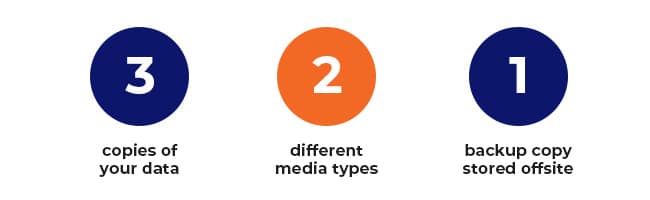
The 3-2-1 data backup is similar to keeping a spare house key under the doormat and another with a trusted neighbour. It’s called “3-2-1” because:

  • 3: You must have at least three copies of your data (including the original).
  • 2: You must use at least two different media types for storage.
  • 1: You must have one backup copy in the cloud or offsite.

While no foolproof backup method exists, the 3-2-1 system works well because it decreases the chance of total data loss and multiplies your protection. It is also easy to implement even for small businesses.

How to do a 3-2-1 Cloud Backup

How to do a 3-2-1 Cloud Backup

Here are the steps to doing a 3-2-1 cloud data backup:

Step 1: Decide which data should be backed up.

First, all critical data must have backups. Critical data is any information that is vital to the operation of your business, such as:

  • Customer data
  • Employee data
  • Transactions and sales data
  • Strategies
  • Marketing Plans
  • Intellectual Property

You also have various files and folders that are used by your employees daily. Which of them do not need a backup? If a file is retrievable from official sources (e.g., installers, media), then you don’t need to back it up.

Overall, the questions you need to ask about each item are:

  • Does it contain critical data? If yes, then you must back it up.
  • Will it still be useful after data restoration? If yes, you could back it up.
  • Will it fit in my backup storage space? If yes, you could back it up. If not, don’t back it up unless you can get additional storage for it.

Step 2: Choose where you will store your second copy.

The original copy of your data is your master copy. Choose where to keep your second copy, preferably on a different media or device like:

  • Hard drives (in a laptop, tablet, desktop not containing the master copy)
  • External hard drives
  • NAS device
  • Other removable storage like tape drive, flash drive, or RAID drive

The value of the second copy is in the speed of recovering and restoring the data, since it is kept in the same location as the original.

Step 3: Choose where you will store your offsite third copy.

Your offsite data backup storage options can include:

  • External hard drives to be kept at another business location
  • Memory cards to be kept in a safety deposit box
  • Removable storage to be kept in a remote storage facility
  • Other storage media or device to be kept in another safe location
  • Cloud platforms

The value of the third copy is in being in a location that will not be affected by events that might happen at the master copy location.

cloud-backup

Cloud data backups

A cloud data backup is stored in a remote server in the cloud. Your data is stored off-site, where it is meant to be safe from disasters or cyber-attacks.

Cloud backups are very useful to businesses that have limited resources to manage their own backups.

With the various cloud backup options, it is best to consult an IT services expert.

You can always reach out to us about cloud backups and the 3-2-1 backup rules:
ASK US ABOUT BACKUP SOLUTIONS

Data backup tips

These tips can be useful whether you do any kind of data backups:

Do backups regularly

Some back up their critical data daily. You could do it hourly or once a week or every month. The frequency may depend on how often your data changes and how important the data is.

Test your backups

Make sure that your backups are working properly. You can do this by trying to restore your data from your backups.

Protect your backups

Make sure your onsite backup is kept in a locked that drawer or cabinet. For cloud backups, you could make your backup “immutable” (not modifiable while in the cloud).

Create a Plan for Backups & Disaster Recovery

Data backups are important to protecting your business from disruptions and their consequences. Backups should be integral to a Disaster Recovery Plan (DRP) if you want to minimise unplanned downtime, reduce costs and losses, and protect your assets and your reputation. Whether you’re in Brisbane, Townsville, or beyond, a robust backup strategy is essential for resilience.

Discover more about a DRP and how it can work for your business.
SEE HOW

You may also book a free consultation with our friendly security experts.
GET A FREE CONSULTATION

How to Minimise Downtime and Ensure Business Continuity in a Professional Services Business

Life in a professional services business might seem constant to an outsider. However, like life in the quiet suburban neighbourhood at Ramsay Street in Neighbours, unpredictable things are bound to happen.

Just when you think everything is running well, a technical glitch or cyber incident can bring your business to a screeching halt. While drama keeps the long-running soap running, it’s what you want to avoid in business.

That’s why we’ve put together strategies to handle the unexpected, such as a data breach, so you can minimise downtime and ensure business continuity in your professional services business.

Included in this article:

Industry snapshot of Professional Services in Australia

The Professional, Scientific, Technical Services industry includes 269,115 businesses that employ more than 1.2 million people. Most of them work in IT, accounting, legal services, and architectural engineering and technical services.

Between 2018 and 2023, Australian professional services revenue has grown to above $263 billion. Over 75% of this came from Engineering Consulting, Management Consulting, Legal Services and Accounting Services.

While things look good overall, the professional services industry is a “potentially valuable target” for cyber criminals, according to Consultancy.com.au. One report found that certain prolific adversaries are known to target professional services firms, causing unwanted downtime.

“Downtime” and “business continuity” defined

“Downtime” is the time when a machine or device (such as a computer) is “not in operation, especially as the result of a malfunction,” or when a network or cloud-based resource is not available or inaccessible. In general, downtime can include all non-productive time, due to any cause.

“Business continuity” refers to the ability of a business or organisation to continue operating and servicing its customers in the event of disruptions or unexpected events that could potentially impact its normal operations, such as a power outage, IT malfunction or major disaster. When business continuity measures are implemented, downtime is minimised.

Unplanned downtime in a Professional Services setting

Businesses in the professional services industry can be significantly affected by downtime caused by:

  • Technical issues – server crashes, network failures, software glitches, or hardware malfunctions.
  • Cyberattacks – cyber security threats such as malware, ransomware, phishing attacks, or data breaches.
  • Human error – accidentally deleting files, mishandling equipment, or misconfiguring systems.
  • Natural disasters – floods, fires, earthquakes, or severe weather.

Any of these can cause downtime and affect normal business operations.

The consequences of unplanned downtime

Natural disasters can cause physical damage, disrupt power supply, and affect communication networks. On the other hand, technical issues and cyber incidents can cause major disruptions because professional services rely heavily on technology.

Whatever the cause of work stoppage or slowdown, the business will be affected. The consequences can be severe, depending on the extent and duration of the downtime, and may include:

  • Loss of revenue
  • Decreased productivity
  • Damage to reputation
  • Security risks
  • Increased costs
  • Legal and regulatory compliance risks

These effects can be far-reaching, so it is important to take steps to prevent downtime and to prepare contingency plans.

Strategies for downtime reduction in your business

To minimise the negative impacts of unplanned downtime, your professional services firm can undertake the following strategies.

Implement preventive maintenance

Regular maintenance of equipment and systems, including computer hardware and software, can help prevent unplanned downtime due to equipment failure or malfunction.

Preventive maintenance includes installing software updates and patches, replacing old or outdated hardware, and proactively addressing any issues. A bonus side effect of preventive maintenance is it can help extend the lifespan of IT equipment and systems, improve performance, and reduce repair and replacement costs.

Conduct risk assessments

Regular risk assessments of your IT infrastructure can identify vulnerabilities and strategies to mitigate risks. When you are aware of those, you can prepare for updating hardware and software, implementing stronger security protocols, and prioritising areas for improvement.

Aside from minimising downtime, this can also protect your business’ systems and data, and ensure continuity while complying with industry regulations.

Invest in backup systems

It is wise to have redundant data storage such as cloud-based storage or off-site backups. They can help ensure data can be quickly restored in case of a system failure or data loss. Make sure you take regular backups of critical data, then regularly test and update these backup systems to ensure that they are functioning as intended.

Monitor systems and processes

Regular monitoring of systems and processes can help detect potential IT issues before they escalate into major problems.

There is a range of IT management tools and solutions you can consider, such as network monitoring software and performance analytics tools. These can provide real-time monitoring and alerts on system health, identifying potential issues before they result in downtime or service disruptions.

Provide staff training

Providing staff with regular training can help you minimise the likelihood of unplanned downtime due to human error. You can develop training programs about cyber security awareness, proper use of equipment, safety procedures, and emergency protocols.

Depending on your objectives, you can utilise a number of training methods such as in-person sessions, online learning platforms, or one-on-one coaching sessions with more experienced staff members.

Keep training relevant by regularly reviewing and updating them so they remain effective in addressing emerging threats and technologies.

Develop a business continuity plan

This is one of the most important best practices to reduce downtime and/or its impact on your business. Create a business continuity plan that outlines strategies for responding to and recovering from unplanned downtime.

How to create a Business Continuity Plan for a Professional Services firm

Unplanned downtime is a huge challenge that can be costly and disruptive, so it is essential to create a business continuity plan. Here are some things to consider when creating one:

1. Identify critical components.

Start with identifying the elements that are crucial to your business. This includes the essential systems, processes, and people.

After identifying these critical components, create a plan to maintain or restore them in the event of unplanned downtime. This could include backup systems, redundant servers, or alternative work arrangements for employees.

2. Test your plan regularly.

This is like conducting emergency drills. Emergency systems, facilities, and equipment are not useful if they do not work in real situations. It is therefore crucial to ensure that your business continuity plan works effectively.

Schedule regular tests and simulations to identify any weaknesses in your plan and make any necessary adjustments. Doing so can help you avoid costly surprises during an actual emergency.

3. Communicate your plan.

Your business continuity plan is only effective if everyone knows what to do during an emergency. Make sure that your employees are aware of the plan and their roles in it.

Inform your suppliers and customers of any changes to your operations during downtime to help them adjust their plans and minimise any impact on their business. Provide your customers with timely and accurate information about delays or disruptions to your products or services.

Keeping all your stakeholders informed and updated can also help to maintain trust.

Implement a Disaster Recovery Solution & Business Continuity Plan Today

While TV shows intentionally integrate unexpected events into the plot, your goal should be to avoid unplanned downtimes from happening. Now, a disaster recovery solution can’t eliminate downtime as some of the causes may be out of your hands, but with a plan in place, it can help minimise the effects to your business.

Talk to our friendly technical specialists for a free consultation to help safeguard your business in Brisbane, Townsville, or beyond.

BOOK YOUR FREE CONSULTATION

Pilcher’s Mitre 10

This project was carried out to increase reliability, performance and efficiency of Pilcher’s Mitre10 infrastructure. ADITS provided suitable recommendations for new and upgraded LOB Application infrastructure to provide the client with increased system reliability.

This project was completed on Saturday with final checks on Sunday to ensure the Team could begin trade on Monday morning, without interruption.

How to prepare your business for the Holidays

The decorations are up, the playlist full of carols is on and the holiday food bellies are coming out! BUT, is your business prepared for the holiday season? There are many items on your checklist, but here are a few from a technology standpoint.

1. Schedule disruptive work whilst you are closed

The excuses used to put off maintenance during the year are no longer relevant during the holiday period. Use the empty office to your advantage and the holiday period, wisely. Finish the office renovations, complete major infrastructure upgrades and enter 2021 prepared for success. We are staying open this Holiday Season to complete major projects for our customers, staying true to our purpose of supporting our business community to achieve their mission. Please contact us if you require assistance during this time.

2. Back up all data

Unfortunately, 2020 didn’t come with a reset button, BUT you can create one (of sorts) for your data. Do a final back up of all your documents before you leave and, preferably, before any eggnog is consumed. That way, if anything goes south, you can click the ‘restore’ button, and reset your 2021.

3. Shut down all equipment properly

You may be surprised to hear this, but your computer, as in, a man-made machine, sometimes needs a break too. When shut down, all software and programs are closed and the random access memory (RAM), which is the short-term memory in the computer is cleared. This means that when re-booted, the computer will run much more efficiently. Other benefits include extended lifespan of the technology, saving money and adding an extra security layer, as the device and its programs are closed.

4. Create “out-of-office” messages

You are leaving yourself open to negative customer experiences when you do not communicate your opening hours with your customers. Make the message clear that you are closed for business to minimise communication and eliminate the temptation of the ‘follow-up’ email. Hot Tip: The poor person who is sending emails during the holidays is clearly not sipping cocktails in Mykonos. So, be creative with your out-of-office message and use it as an opportunity to brighten someone’s day.

Happy Holidays! Sending warm wishes for a joyous season filled with happiness and cheer, whether you’re in Brisbane, Townsville, or beyond! 🎄✨

Going away for the Holiday period? Prepare your business now

Although this year, you may not be able to (social) distance yourself as far from your desk as you would like, its important that you prepare for your time off, accordingly. We are here to help you do just that, so you can put your feet up, and keep them up!

1. Prepare your workforce

If your business is staying open, ensure that your employees are prepped to run a tight ship whilst you are away. Conduct training that specifically prepares them for the unique period. Remember, if hiring extra staff, think about whether you would hire them in a full-time position before doing so.

2. Prepare your inventory

There is nothing worse than a potential customer being turned away due to out-of-stock issues. Anticipate demand based on previous years or competitor’s sales and ensure your stock levels are adequate to make product sales and complete services.

3. Remote access

Let’s face it, problems are inevitable, and they may be issues where your attention is required. But why go into the workplace to deal with them if you don’t have to? Before you go away, ensure your IT Provider has given you sufficient remote access. This way, you can check-in from the comfort of your home office, the couch, or even the loo (Hey – we are covering all bases here!).

4. Place your IT Team on speed-dial

Although you are having downtime, your systems should not be. As an IT Provider available 24/7, we are available for any and all service requests, no matter the day or time. Please add us to your Favourites List to make contact even easier. As long as you promise not to take advantage and call us to escape Great Aunt Marge at Christmas Dinner.

Have a safe and happy Holiday! Wishing you joy, peace, and happiness this festive season, whether you’re in Brisbane, Townsville, or beyond. 🎄✨