4 Key Benefits of Cloud Backup for Healthcare You Can’t Ignore

In April 2024, MediSecure, an Australian electronic prescription provider, experienced a significant ransomware attack that compromised the personal data of approximately 12.9 million Australians

The stolen data included sensitive information such as full names, phone numbers, addresses, Medicare numbers and prescription details. 

This breach offers a stark reminder of just how vulnerable healthcare IT systems can be. With patient data on the line, having a reliable cloud backup for healthcare in place has never been more critical. This is why it’s vital for healthcare providers to understand the full benefits of club backups.

Why cloud backup matters

Cloud backup for healthcare is much more than a safety net. It’s an absolutely necessary part of any healthcare organisation’s cyber security strategy. They help prevent the kind of large-scale data loss seen in breaches like MediSecure by keeping sensitive patient information secure and accessible.

Beyond security, reliable cloud backups mean healthcare providers can access the data they need. And when they need it. For instance, the Australian Digital Health Agency notes that 80% of health consumers expect innovative digital tools to enhance their care, and having data at your fingertips is a big part of delivering that experience.

Despite this, some practices still rely on local servers or physical backups, which are far more vulnerable to unexpected events. And while Microsoft 365 offers built-in backup features, they don’t cover everything—as we explore in our article, Why Microsoft 365’s Built-In Backup Isn’t Enough.

In short, cloud backups for healthcare have become standard for a reason. Here are four ways they can transform the way your practice protects and manages patient data:

  1. Better patient care, every time

‘Good collection and use of health data leads to better health care,’ says the Department of Health and Aged Care. And it’s easy to see why. When a doctor can’t access a patient’s full medical history because of a server outage or other technology disruption, care can be delayed or even compromised.

While on-premise servers are still important for running critical applications, pairing them with cloud backups takes your data security—and patient care—to the next level.

For example, with cloud backups, healthcare professionals can securely store patient records and gain 24/7 access to them from anywhere with an internet connection.

That means doctors and nurses can access the information they need instantly, even during unexpected events. 

So how do cloud backups actually improve patient care? By giving healthcare teams faster, reliable access to records, they can diagnose sooner, plan treatments more efficiently, and deliver better outcomes for every patient.

 2. Faster recovery and minimal downtime

No IT system is completely immune to surprises. Whether it’s a power outage, a natural disaster or a cyberattack, the unexpected can hit when we least expect. 

Imagine a cyclone, for example, hitting and taking your practice’s servers offline. In an unanticipated event like this, how quickly could you access patient records and get back to caring for patients?

Downtime in healthcare is a lot more than a mere convenience. It can affect patient safety and cost your practice thousands for every minute offline. The longer the disruption, the bigger the impact. Basically, the longer the disruption, the bigger the impact. 

And that’s where cloud backups make a real difference. With data stored securely off-site, you can recover quickly and keep your practice running smoothly. 

The Australian Government advises healthcare providers that ‘having a recent backup of your data will help you to recover more quickly,’ reinforcing why offsite solutions are essential for continuity of care.

 3. Stay compliant and protect patient data

Patient data is incredibly sensitive. And the healthcare sector is under constant pressure to meet strict regulations. 

The World Economic Forum stresses that ‘stringent rules and regulations must be put in place to secure sensitive patient data,’ and cloud backups can be a huge help in staying compliant.

Here’s how they support your obligations:

  • Data Security: Australian Privacy Principle (APP) 11 requires healthcare providers to protect patient data from unauthorised access, loss or disclosure. Cloud backups use strong encryption to keep information safe. Even if a breach occurs, the data is unreadable.
  • Access Controls: APP 1.3 mandates control over who can access personal information. Cloud solutions let you set precise permissions. That way, only authorised staff can view or edit patient records.
  • My Health Record Integration: Cloud backups work seamlessly with My Health Record, ensuring that patient data stays secure while being shared safely between providers.

With cloud backups in place, you can confidently deliver care, knowing your patients’ information is protected and your practice is meeting its compliance obligations.

  4. Easy scalability and smarter cost management

As your practice grows, so does your data. And traditional on-site servers can quickly become a bottleneck. Upgrading means expensive hardware, potential compatibility headaches and frustrating downtime. 

Cloud backup for healthcare takes all that off your plate. They scale effortlessly as your needs increase, so you’re not constantly investing in new servers or worrying about running out of space.

Beyond convenience, cloud solutions are also cost-smart. McKinsey & Company reports that moving to the cloud can reduce IT costs by 30–40%, freeing up resources that can be better spent on patient care and other priorities.

Protect your patients and your practice with reliable cloud backups

In healthcare, every second counts, and so does every byte of data. With cyber threats on the rise, safeguarding patient records is no longer optional. Cloud backup solutions give you peace of mind, secure access to critical information, and the ability to recover quickly from any unexpected event.

At ADITS, we help healthcare providers across Brisbane, Townsville, and Queensland implement tailored backup strategies that fit your practice’s needs. From compliance and security to cost-effective scalability, we make it simple to protect your data and keep your day-to-day operations running on track.

So let’s make sure your practice is prepared for anything. Reach out today to see how ADITS can help secure your patient data and streamline your IT.

Your Easy Guide to the 3-2-1 Cloud Backup Strategy

If you’ve ever experienced a fire or destructive flooding or a burglary, you know the importance of protecting your vital documents.

In running your business, you keep essential business documents in a fireproof safe or in a locked cabinet. Likewise, you must keep your business data well protected, and data backups are crucial to this.

Why back up your data?

A data backup is defined as “a digital copy of your important data.” Data backups are necessary for business, especially small and medium-sized businesses (SMBs), which are likely cyberattack targets. Data backups are a must so you can:

shield

Prevent data loss

This can happen due to hardware failure, software corruption, or cyberattacks. A backup is your insurance in case something happens to your original data.

disaster-recovery

Recover from cyberattacks

Cyberattacks can be devastating for any business. In such a case, a backup can reduce your downtime. You can restore your data and normalise your operations faster.

lawyer

Meet compliance requirements

There are data protection regulations for businesses to comply with. Doing backups can demonstrate compliance, such as aligning with The Essential 8 baseline security measures.

cyber-security-service

Protect your business reputation

Losing your customers’ data can lead to loss of trust in your business. Backups can help protect your business reputation by ensuring that your customers’ data is safe.

piggy-bank

Minimise costs

If you lose your data, you may have to pay to recover it or rebuild it. A data backup can save you money by preventing a total data loss.

handshake

Gain peace of mind

Having backups lessens your worries. You can focus better on running your business rather than having doubts about the safety of your data.

What backup methods can you use?

Some common methods for backing up your business data are:

On-site backup

This involves backing up your data to a storage device, such as an external hard drive or a network-attached storage (NAS) device (linked to your local network). On-site backups are easy to set up and maintain.

Off-site and cloud backups

This means backing up to a device in a remote location or via a cloud storage service. Cloud and off-site backups are less vulnerable to local disasters, such as fire or theft. Cloud backups have the advantage of being accessible from anywhere.

Hybrid backup

This involves backing up your data to an on-site device and then copying that data to an off-site location. Hybrid backups offer the best of both worlds: they are easy to set up and maintain like on-site backups, and they are as secure as off-site backups.

The best backup method for your business will depend on your specific needs, budget, and technical skills. If you want a highly secure strategy, you could consider the 3-2-1 backup solution.

What is the 3-2-1 backup strategy?

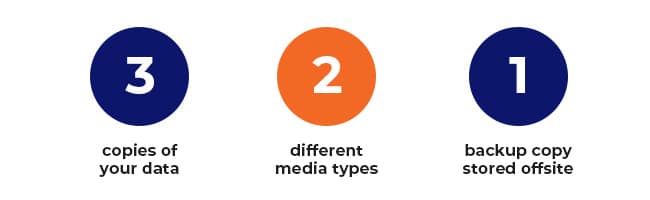
The 3-2-1 data backup is similar to keeping a spare house key under the doormat and another with a trusted neighbour. It’s called “3-2-1” because:

  • 3: You must have at least three copies of your data (including the original).
  • 2: You must use at least two different media types for storage.
  • 1: You must have one backup copy in the cloud or offsite.

While no foolproof backup method exists, the 3-2-1 system works well because it decreases the chance of total data loss and multiplies your protection. It is also easy to implement even for small businesses.

How to do a 3-2-1 Cloud Backup

How to do a 3-2-1 Cloud Backup

Here are the steps to doing a 3-2-1 cloud data backup:

Step 1: Decide which data should be backed up.

First, all critical data must have backups. Critical data is any information that is vital to the operation of your business, such as:

  • Customer data
  • Employee data
  • Transactions and sales data
  • Strategies
  • Marketing Plans
  • Intellectual Property

You also have various files and folders that are used by your employees daily. Which of them do not need a backup? If a file is retrievable from official sources (e.g., installers, media), then you don’t need to back it up.

Overall, the questions you need to ask about each item are:

  • Does it contain critical data? If yes, then you must back it up.
  • Will it still be useful after data restoration? If yes, you could back it up.
  • Will it fit in my backup storage space? If yes, you could back it up. If not, don’t back it up unless you can get additional storage for it.

Step 2: Choose where you will store your second copy.

The original copy of your data is your master copy. Choose where to keep your second copy, preferably on a different media or device like:

  • Hard drives (in a laptop, tablet, desktop not containing the master copy)
  • External hard drives
  • NAS device
  • Other removable storage like tape drive, flash drive, or RAID drive

The value of the second copy is in the speed of recovering and restoring the data, since it is kept in the same location as the original.

Step 3: Choose where you will store your offsite third copy.

Your offsite data backup storage options can include:

  • External hard drives to be kept at another business location
  • Memory cards to be kept in a safety deposit box
  • Removable storage to be kept in a remote storage facility
  • Other storage media or device to be kept in another safe location
  • Cloud platforms

The value of the third copy is in being in a location that will not be affected by events that might happen at the master copy location.

cloud-backup

Cloud data backups

A cloud data backup is stored in a remote server in the cloud. Your data is stored off-site, where it is meant to be safe from disasters or cyber-attacks.

Cloud backups are very useful to businesses that have limited resources to manage their own backups.

With the various cloud backup options, it is best to consult an IT services expert.

You can always reach out to us about cloud backups and the 3-2-1 backup rules:
ASK US ABOUT BACKUP SOLUTIONS

Data backup tips

These tips can be useful whether you do any kind of data backups:

Do backups regularly

Some back up their critical data daily. You could do it hourly or once a week or every month. The frequency may depend on how often your data changes and how important the data is.

Test your backups

Make sure that your backups are working properly. You can do this by trying to restore your data from your backups.

Protect your backups

Make sure your onsite backup is kept in a locked that drawer or cabinet. For cloud backups, you could make your backup “immutable” (not modifiable while in the cloud).

Create a Plan for Backups & Disaster Recovery

Data backups are important to protecting your business from disruptions and their consequences. Backups should be integral to a Disaster Recovery Plan (DRP) if you want to minimise unplanned downtime, reduce costs and losses, and protect your assets and your reputation. Whether you’re in Brisbane, Townsville, or beyond, a robust backup strategy is essential for resilience.

Discover more about a DRP and how it can work for your business.
SEE HOW

You may also book a free consultation with our friendly security experts.
GET A FREE CONSULTATION