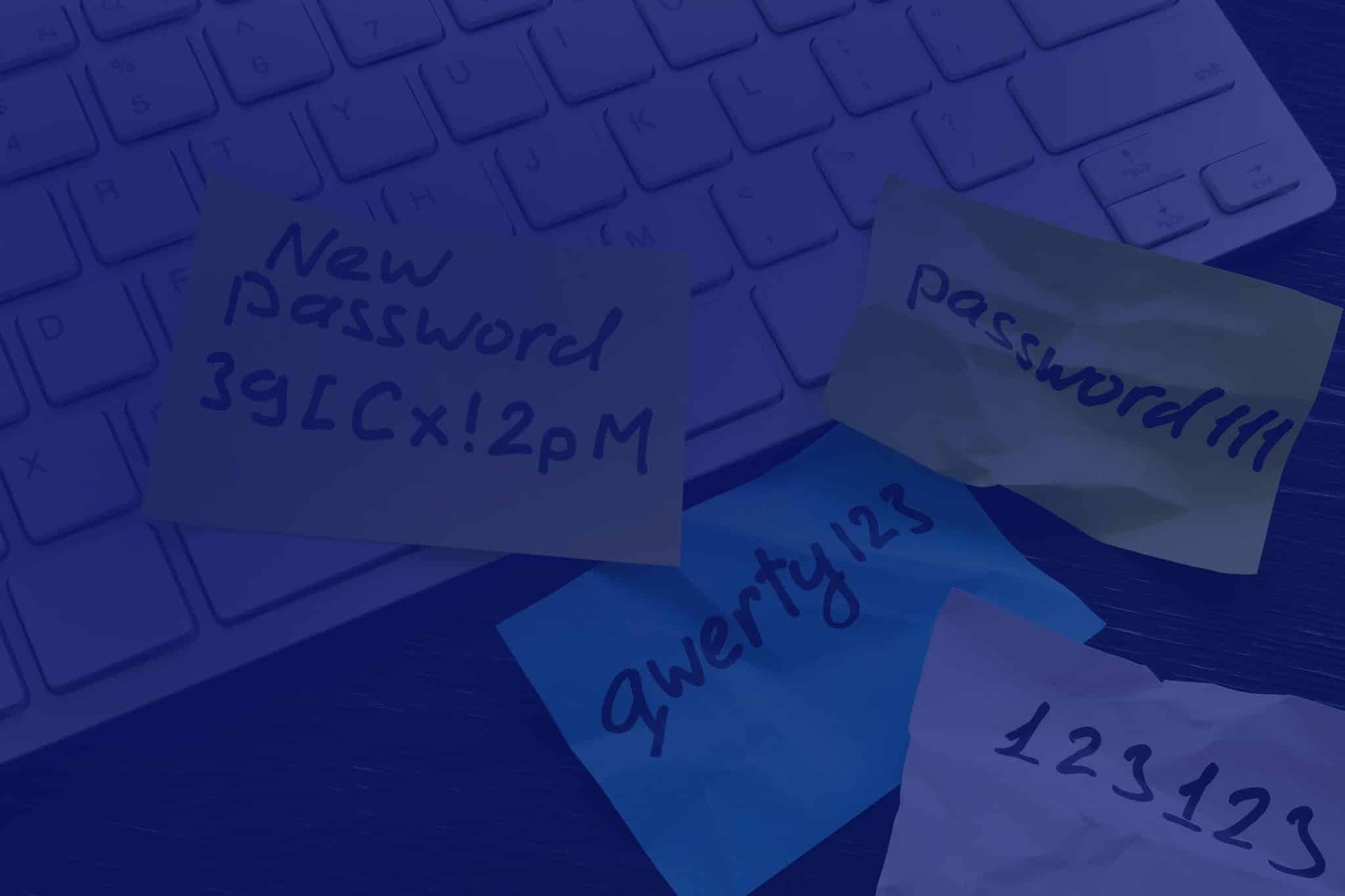
What Is a Password Manager and Is It Really Safe?

How many accounts do you have require using a password?

Think of your email (sometimes multiple addresses), social media (too many channels), productivity platform at work, banking and finance, shopping, streaming, entertainment, gaming, education – the list goes on.

Estimates say that the average person could have dozens to hundreds of accounts. No wonder many people simply use the same password for all of them. That’s a risky practice leaving them vulnerable to cyberattacks, data breaches, and identity theft. However, it’s so much easier than having to remember one password for each of your accounts, right?

There is a safer way: Password managers.

What is a Password Manager?

A password manager is like a personal digital vault. It’s an application that stores your usernames, passwords and sometimes two-factor codes for every account in an encrypted format. It requires a user to remember just one master password to access their vault – you no longer need to recall countless login details for various websites and apps.

Why Use a Password Manager?

Password managers are very convenient and save users a lot of time. As they streamline the login process, the stress and frustration that comes from trying to remember login credentials are removed.

You can also enjoy these benefits from using a password manager:

  • Stronger Passwords: Password manager apps help to generate strong, unique passwords for every account. This reduces the risk of brute-force attacks – a trial-and-error method of trying all possible passwords until the correct one is found.
  • Improved Security: Because password managers do not reuse passwords, you become less vulnerable to data breaches and identity theft. Also, secure password management solutions are aligned with the principles of cyber security services and frameworks.
  • Secure Password Sharing: Some password managers allow users to securely share login credentials with their team, which is safer than sharing plain text passwords.
  • Cross-Platform Compatibility: Most password managers work across different devices, ensuring your login information is always accessible.

How Does a Password Manager Work?

Here’s a simplified breakdown:

  1. Installation: You download and install a password manager app on your computer or mobile device.
  2. Creating an Account: You create an account with the password manager, using a strong and unique master password.
  3. Adding Login Credentials: For each website or application you use, simply add the login details (username and password) to your password manager. For new credentials, the password generator feature available in many password managers comes in handy.
  4. Automatic Login: When you visit a website or app, the password manager can automatically fill in your login credentials, saving you time and effort.
  5. Secure Storage: Your credentials are stored in an encrypted format within the password manager’s vault. This makes it extremely difficult for unauthorised individuals to access your data, even if they were to gain access to your device.


Are Password Managers Really Safe to Use?

You may have heard of the LastPass security breaches and wonder ‘Are password managers really secure’? While risk zero doesn’t exist, it is important to note that there was no flaw in the password manager itself. The attackers instead exploited a vulnerability in third-party software and bypassed existing controls.

This should remind us of the importance of strong security measures. Making sure you enforce strict protocols with your vendors and suppliers is as important as password management.

Our CyberShield and CyberShield+ packages have been designed with this approach in mind. Not only they include an enterprise-grade solution that allows seamless integration and management of passwords across the organisation, but they’re also built around managed IT, security controls and governance.

However, it is fair to question that if a breach happened to LastPass, it could happen to any password manager app, so let’s address that by debunking some common misconceptions:

Myth 1: Password managers are not secure.

Reputable password managers are designed to be secure. Advanced encryption technologies make it virtually impossible for hackers to access your data. Many password managers also utilise multi-factor authentication (MFA) for extra security.

Myth 2: If I lose my master password, I lose everything.

Forgetting your master password is inconvenient, but most password managers offer recovery options. It’s essential to follow the provider’s guidelines for setting up recovery methods to avoid losing access to your passwords.

Myth 3: Storing all passwords in one place is risky.

Keys are often placed together in a keyring or a key safe so they’re not scattered around loosely. In a similar way, storing all your passwords in a secure online password manager is safer than managing them manually. Just make sure your password manager enforces strong password generation and prevents password reuse, so that the risk of a data breach impacting multiple accounts is significantly reduced.

Of course, as previously mentioned, there is no risk-free password manager app. The trick is to find the most secure one that adheres to strict security measures and is perfect for your needs. Here are 7 Tips to Choose the Best Password Manager.

Myth 4: Password managers are too complicated to use.

Modern password managers are user-friendly. Many of them offer intuitive interfaces and features that simplify the password management process. For example, Keeper offers a seamless user experience with its autofill browser extension, allowing you to quickly and securely log in to your favourite websites with a single click.

Myth 5: I can remember all my passwords – so I don’t need a password manager.

We can barely remember to bring milk home on our way back from work, so how are we supposed to remember complex, unique passwords for dozens of online accounts? Relying on memory increases the likelihood of using weak or reused passwords, which can be a recipe for disaster.


Take Control of Your Digital Security

The importance of password safety is easy to underestimate or overlook. But data breaches are wake-up calls that highlight the need for a reliable password management solution.

With a secure password manager, you can enhance your online security posture and reduce the risk of cyberattacks.

At ADITS, we believe that in Brisbane, Townsville, and beyond, a secure password management solution is non-negotiable to create a robust defence against increasingly sophisticated threats in today’s ever-changing landscape.

FIND OUT MORE

Why the SMB1001 Cyber Security Framework is Making Waves

The digital revolution has brought not only fantastic opportunities but also increased the attack surface when it comes to threats. Nearly half of Australian SMBs have already been targeted by cyberattacks with the cost of cybercrime averaging between $46,000 to $97,000 for small and medium sized businesses.

These statistics should serve as a wake-up call, highlighting the urgent need for robust cyber protection!

That’s when cyber security frameworks come in. They provide a structured approach to managing cyber risks, ensuring compliance with industry regulations, and incorporating best practices for IT security.

With the many frameworks available these days, this article will delve into the SMB1001 and look at why it is a game changer for smaller organisations.


An Overview of Cyber Security Frameworks

First, it is important to understand that cyber security frameworks provide a common language and methodology for discussing and managing risks. They aim to safeguard your data, systems, and ultimately, your business’ reputation.

Some of the top cyber security frameworks in Australia are ISO 27001, NIST, CIS Controls and the Essential Eight (E8).

The E8 are supported by the Australian Government who developed it through the ACSC back in 2017 to help businesses mitigate cyber threats. While it is not mandatory for private businesses, it is strongly recommended.

After 7 years, we’re able to look back and realise that these traditional frameworks present challenges for smaller organisations that are looking for something less complex, not resource-intensive to implement, and more flexible to suit their needs.

SMB1001: A Clear Path to Cyber Maturity

Dynamic Standards International (DSI) developed SMB1001 to fill the gap in cyber security certification for SMBs.

It addresses the unique challenges faced by SMBs in implementing effective cyber security measures without the complexity and high costs associated with larger, more comprehensive frameworks.

It covers essential security practices across various areas such as incident response, risk management, and employee training, which are often overlooked by simpler frameworks like the Essential Eight.

So, what makes SMB1001 work?

The framework’s certification process is straightforward, practical, and built around five areas of focus:

  • Technology Management – This pillar focuses on managing and securing the technology infrastructure, including hardware, software, and networks. It involves implementing security controls such as firewalls, antivirus software, and intrusion detection systems to protect against cyber threats. Regular updates and patch management are also essential to ensure that all systems are protected against known vulnerabilities.
  • Access Management – This involves controlling and monitoring access to information systems and data. It includes implementing strong authentication mechanisms, such as multi-factor authentication, to ensure that only authorised individuals have access to sensitive information. Access controls should be regularly reviewed and updated to reflect changes in personnel and roles within the organisation.
  • Backup & Recovery – Regular data backups and having a robust recovery plan in place is important. It ensures that data can be restored in the event of a cyber incident, such as a ransomware attack. A well-defined recovery plan helps minimise downtime and ensures business continuity by outlining the steps to be taken to restore systems and data.
  • Policies, Plans, & Procedures – this involves developing and implementing comprehensive cybersecurity policies, plans, and procedures. These documents provide guidelines for the organisation’s security practices and response to cyber threats. They should cover areas such as incident response, data protection, and employee responsibilities. Regular reviews and updates are necessary to ensure that the policies remain effective and relevant.
  • Education & Training – The SMB1001 framework is designed to be clear, concise, and accessible even for those without a deep technical background. This approach can empower your non-technical staff to take ownership of your cyber security posture. Everybody, at all levels, gets the chance to contribute to keeping the organisation protected. The responsibility of cyber security involves the entire organisation:
    • Employees, by following best practices like not opening suspicious emails, using strong passwords, and regularly updating their software.
    • Managers, by allocating resources for cyber security training and tools.
    • Executives, by prioritising cyber security at a strategic level.

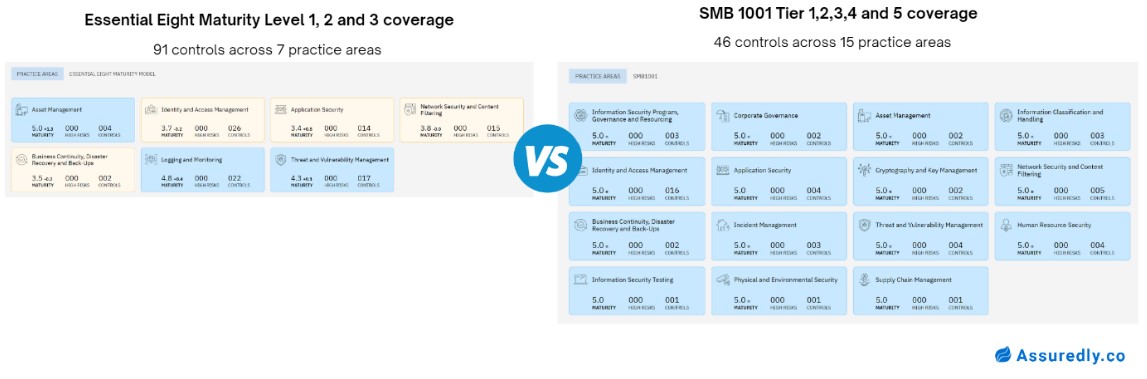
SMB1001 vs. The Essential Eight

Both frameworks have the same goal which is to enhance cyber resilience, but SMB1001 provides a more accessible entry point for businesses of all sizes. It also covers more of the key practice areas that support a robust security program.

In the contrary, the E8 requirements are more technical and complex to comprehend, often leaving small business owners confused and not confident enough to continue building out their security posture.

Take Action with a Reliable Partner

ADITS’ cyber security solution, CyberShield, is built around essential security controls outlined by the SMB1001 :23 Silver Tier 2. Take control of your cyber security today – with expert guidance. ADITS can help your business through comprehensive cyber security services in Brisbane and Townsville.

CyberShield Brochure

With data becoming an invaluable asset and stricter rules regarding its protection, we have enhanced our offerings with CyberShield +, an advanced cyber security solution for businesses. It includes everything from CyberShield, plus a cyber security awareness program through uSecure and compliance to the mandatory Privacy Act.

CyberShield+ Brochure

Strategies for Cyber Security, Continuity and Emergency Response in Queensland Critical Infrastructure

Every Australian relies every day on energy, food, water, transport, communications, health, and banking and finance services. These essentials support our way of life and underpin our economy, security, and sovereignty. Therefore, disruptions to those critical infrastructures can cause significant, if not disastrous, impacts.


Rising Risks to Our Critical Infrastructures

Cyber actors have been targeting critical infrastructures in recent years, like Medibank, Optus, and Latitude. More recently, an unauthorised network access occurred at DP World Australia, compromising employee data. It forced the business to go offline, disrupting their Brisbane, Sydney, Townsville, Melbourne, and Fremantle operations; goods were stranded in ports for around 10 days.

For the FY 2022-23, the Australian Signals Directorate (ASD) noted 143 reports of cyber incidents against critical infrastructure. These were primarily due to compromised accounts/credentials, compromised assets/network/infrastructure, and denial of service (DoS). Meanwhile, the global trend points to an estimated hundredfold increase in attacks on critical infrastructure by 2027.


Wanted: A Strong Response Strategy

A response strategy is critical to ensure that your organisation is prepared to deal with cyber incidents effectively. It can help minimise the impact of an attack.

Critical infrastructures are also required to have a formal incident response plan in place as per the regulations they need to comply with such as the Security of Critical Infrastructure Act 2018 (SOCI). This law details the legal obligations for owners and operators of critical infrastructure assets, including notification duties and government support in case of incidents. The Act applies to these sectors.

Queensland for instance has outlined a Cyber Security Hazard Plan to mitigate cyber incidents with state-wide or national impacts, that can lead to a response strategy tailored for your organisation:

  1. Prevention: Understanding and minimising the cyber risks that could impact an organisation, the state, or the nation
  2. Preparedness: Reducing the consequences of an incident and ensuring effective response and recovery
  3. Response: Delivery of appropriate measures to respond to a cyber incident
  4. Recovery: Implementing post-incident strategies for recovering systems and restoring services

The strategy emphasies the need for the collective effort of individuals, community groups and organiations, local governments, businesses, the tertiary sector, the Queensland Government, and the Australian Government. This can be done through the Joint Cyber Security Centres (JCSC), a network to exchange information, collaborate, and share resources.

The ASD, via its Cyber Security Partnership Program, also works closely with businesses and individuals to provide advice and information about the most effective ways to protect their systems and data.


Best Practices for Securing Critical Infrastructure

How can you defend your organisation against cyber threats? Here are some best practices for the critical infrastructure sector.

Prevention: Your First Line of Defence
Find a Guiding Framework A robust cyber security framework can help you plot a roadmap for enhancing your protection. At ADITS we follow the SMB1001. It has a clear, step-by-step path and a tiered approach, from essential hygiene practices to a more comprehensive security strategy.
Educate Your Team Empower your staff to be your first line of defence. Train them regularly to equip them for identifying suspicious emails, recognising phishing attempts, and reporting potential threats.
Secure Your Systems Properly set up your digital shield, with firewalls, anti-virus software, data encryption, and strong passwords, which are essential for keeping unwanted visitors out.
Preparedness: Be Ready for Anything
Plan for the Unthinkable Develop a comprehensive cyber incident response plan (CIRP). Outline the roles, responsibilities, and communication protocols in case of an attack. Conduct regular tabletop exercises to test your CIRP. Ensure everyone knows their part.
Stay Informed Stay current on the latest and evolving threats and mitigation strategies. Subscribe to alerts from reputable sources like the ACSC. Knowledge is power – use it to stay ahead of the curve.
Collaboration is Key Build strong relationships with industry peers and government agencies. Sharing information and best practices fosters a collective resilience against cyber threats.
Response: Act Swiftly and Decisively
Early Detection Invest in security monitoring tools to detect suspicious activity promptly. The faster you identify an intrusion, the quicker you can contain the damage and minimise disruption.
Follow Your CIRP Be ready. When an attack hits, follow your CIRP. Ensure everyone communicates clearly while carrying out their well-defined roles. A well-coordinated response will help you mitigate the impact and get your systems back online quickly.
Seek Expert Help Don’t underestimate the value of professional assistance. When faced with a major attack, consider engaging a cyber security services expert to guide your response and recovery efforts.
Recovery: Bounce Back Stronger
Restore Normal Operations Get your critical systems back online as swiftly as possible. Prioritise essential services and have backup and recovery plans in place to ensure minimal disruption.
Learn from the Experience Every incident is a learning opportunity. Conduct a thorough post-incident review to identify weaknesses and improve your defences.
Keep Improving Use lessons learned to continuously ensure your critical infrastructure remains resilient. Consider new technologies and enhance your training and awareness programs.


Elevating Security with AI and Advanced Technologies

Artificial intelligence (AI) is now a cornerstone in fortifying cyber security for critical infrastructure. It can swiftly process vast datasets, identify subtle patterns, and adapt to novel threats, providing unparalleled efficiency and continuous learning.

But AI isn’t the only advanced technology enhancing cyber security. Here are a few more:

  • Cloud Encryption, which can ensure data security in cloud-based platforms
  • Extended Detection and Response (XDR), with improved threat detection and incident response capabilities
  • Blockchain technology’s secure data storage capabilities can be leveraged for data integrity and authentication
  • Generative AI (GenAI), which can detect and respond to cyber threats in new ways


Your Next Step: Assess Your Risk Factors

With employees being your first line of defence, ensuring continuity and proper emergency response begins with identifying your human risks. ADITS’ free Human Risk Report (HRR) will help you identify domain impersonation threats and released credentials. You will receive a comprehensive report with some actionable tips as well as a free phishing campaign to test your employees’ awareness.

Cyber Security in Education: Protecting Student Data in Australian’s Schools

Cyber security for educational institutions is more crucial than ever with the ASD Cyber Threat Report 2022-2023 highlighting the education sector has being one of the prime targets for cyber crimes. Schools must therefore strengthen their security and compliance measures.

The Rising Threat Landscape in Education

In recent years, the education sector has become increasingly susceptible to cyber threats. Australia saw a 51% increase in cyber incidents reported by critical infrastructure organisations, including educational institutions. A Check Point Research study showed a weekly global average of 1,739 attacks per education or research organisation.

With 90% of data breaches due to phishing attacks worldwide, students, teachers, and staff are also often targeted through deceptive messages.

Cyber-attacks on the sector are not random. They are targeted and strategic, driven by the potential rewards and the relatively lower security defences compared to other sectors.

Reason #1: Valuable Data

Educational institutions hold a wealth of sensitive data, including personal information of students, staff, and parents, as well as financial records and intellectual property. This data can be highly valuable for cybercriminals seeking to sell it on the dark web or use it for identity theft.

Reason #2: Diverse User Base

Schools and universities have diverse populations of students, teachers, and staff with varying levels of IT expertise. Some are tech-savvy digital natives while others are still mastering computer basics. Everyone needs training and support to ensure each can confidently and securely collaborate better.

Reason #3: Limited IT Resources

Smaller schools often face resource constraints. Staff must juggle multiple responsibilities, including network maintenance, user support, and security. Tight budgets limit cyber security investment. Some could have aging hardware and limited bandwidth. Schools must therefore explore cost-effective cyber security solutions.

Reason #4: BYOD Risks

Bring your own device (BYOD) allows students and staff to use personal devices for learning, but also present security risks:

  • Personal devices may lack proper security measures.
  • Sensitive information can leak if devices are compromised.
  • Infected devices can spread malware within the school network.

Schools can manage BYOD risks by:

  1. Establishing clear policies and guidelines for acceptable device usage
  2. Implementing network segmentation, isolating BYOD devices from critical systems
  3. Adopting mobile device management (MDM) solutions to enforce security policies
  4. Enforcing regular audits to assess compliance and address vulnerabilities

Impact on the Sector

Successful attacks disrupt operations and put student data, including personal and academic records, at risk. This undermines privacy and trust, leading to potential identity theft, financial fraud, and emotional distress.

Technological Innovation in Education

The rapid shift to digital learning environments, especially during the COVID-19 pandemic, has increased the attack surface for cybercriminals. With more devices connected to school networks and the use of various online platforms, there are more opportunities for vulnerabilities making cyber security solutions an all-time priority.

Remote Learning Platforms

Online learning platforms have bridged geographical and time boundaries. Students in any location now have access to the same kind of education. There are live online sessions, shared cloud resources, and virtual interaction. Platforms like Microsoft Teams for Education are boosting collaboration and engagement.

Digital Learning Tools

The sector has also benefitted from the proliferation of digital tools. Interactive whiteboards are replacing traditional chalkboards, allowing dynamic lessons and easier understanding of complex concepts.

Adaptive learning software enable personalised learning pathways. They can analyse student performance and adjust content accordingly. Virtual reality (VR) and augmented reality (AR) are also transporting students beyond textbooks.

Increased Reliance on Technology

Technology has become integral to the educational journey. Laptops, tablets, and Wi-Fi are now lifelines for learning. Teachers are harnessing digital tools to create more engaging content and enhance teaching methodologies.

Educators have shifted from traditional lectures to student-centred learning – facilitating discussions, encouraging critical thinking, and guiding students. Students are empowered by technology to collaborate, create, and explore.

Australian Laws and Regulations

As schools chart a course toward safer digital horizons, they must also comply with relevant regulations.

The Privacy Act 1988

The Privacy Act covers private schools, except those that fall within the small business exemption or do not provide health services (e.g., physical education classes, nursing services). The Australian Privacy Principles (APPs) prescribe how schools must:

  • Have data privacy procedures, practices, and systems to ensure compliance
  • Handle personal data transparently, ensuring consent, accuracy, and security
  • Demonstrate accountability by promptly addressing queries and complaints

Apart from the Australian Capital Territory (ACT), government schools are not directly covered by the Privacy Act. They fall under state or territory privacy legislation or schemes. In Queensland, for example, the transfer of personal information between schools without consent is allowed before enrolment in a new school.

The Australian Education Act 2013

The Australian Education Act governs Commonwealth funding to both government and non-government schools. It specifies specific requirements to receive Australian Government funding for school education, covering student data protection, educational reforms, and financial accountability. Schools are required to manage student data prudently and proactively while fulfilling their educational mission.

Best Practices for Cyber Security in Schools

Safeguarding digital learning environments is highly important today. Educators are responsible for protecting their students, staff, and sensitive data from cyber threats. Below are some best practices:

Password Hygiene

Educate students, teachers, and administrators – everyone in your school community — to create strong, unique passwords.

  • Combine uppercase and lowercase letters, numbers, and special characters
  • Never reveal a password to anybody
  • Encourage regular password updates or implement a password expiration policy

Data Encryption

All sensitive information (e.g., student records, financial data, and research findings), must be encrypted. Encryption ensures that even if data falls into the wrong hands, it remains unreadable. Consult with your IT provider about the different industry-standard encryption methods such as Transport Layer Security (TLS), Full Disk Encryption (FDE) and File-Level Encryption.

Incident Response Plan

Swift action is crucial when a breach occurs. Handling security incidents starts with preparing a well-defined incident response plan, which should include:

  • Designated Incident Response Team: Identify key personnel responsible for handling incidents.
  • Communication Protocol: Establish clear lines of communication during an incident.
  • Containment and Recovery Steps: Consult with your IT support team to outline the steps to isolate the breach and restore normal operations in your school.
  • Legal and Reporting Obligations: Understand our legal responsibilities and reporting requirements.

These best practices can help schools in Brisbane, Townsville, and across Queensland become more cyber resilient. Remember, it’s not just about implementing the right technology but also about fostering a culture of vigilance and shared responsibility among staff and students.

Cyber Security Training for Education Sector Leaders

If you’re not sure where to start with fostering a cyber aware culture in your school or university, ADITS conducts tailored cyber security training sessions for boards and school executives. Kindly fill up the form below:

The ROI of Managed Security Services: How Investing in Cyber Security Pays Off

You are aware of the risks posed by cyber threats to your business. You know the potential devastation a cyber attack can cause. You’re convinced that cyber security measures can protect you against cyber threats. But how do you know it’s working?  

Let’s delve into the tangible benefits of managed security services (MSS), demystify the return on investment (ROI) calculation, and guide you toward making informed choices for your cyber security strategy.  

Ready? Click any topic below or simply read on: 

Understanding the Cost of Cyber Attacks

Before we explore the ROI, let’s tackle the cost of cyber-attacks. Beyond the immediate financial hit, cyber incidents disrupt operations, erode customer trust, and tarnish reputations.  

From legal fees and regulatory fines to lost productivity and brand damage, the impact is far-reaching. But what if there were a way to mitigate these risks and turn the tide in your favour? 

Calculating the ROI

ROI is the litmus test for any business investment. The simple financial equation is: 

ROI = (Gain from investment – Cost of investment) / Cost of investment 

Gains from investment includes cost savings from avoided breaches, reduced downtime, and streamlined operations, while Cost of Investment is the price of your MSS solution.  

Your Gains from Investment: The Hidden Savings

When evaluating your ROI, you need to consider the following scenarios. 

Avoided Breaches 

Every thwarted cyber-attack translates to saved dollars. In Australia the cost of a data breach has significantly grown since 2018, now reaching AUD $4.03 million according to IBM’s report. 

MSS providers fortify your defences, minimising the chances of a breach. Imagine the financial relief when you sidestep a costly incident. 

Reduced Downtime 

Downtime is the nemesis of productivity. With MSS, rapid incident response and proactive threat hunting keep your systems running. The longer your business stays operational, the greater the ROI. 

Staffing Cost Savings 

Outsourcing security tasks to a third-party provider trims your payroll. Instead of maintaining an in-house security team, you can redirect those funds to growth initiatives. 

Enhanced Productivity and Business Continuity 

Your staff can channel their energy into strategic endeavours rather than firefighting and monitoring. The ripple effect? Enhanced productivity and a smoother operational flow. 

A Managed Security Provider can also help to ensure your business stays compliant with laws and regulations. Reducing your risks of attacks and hefty fines. 

Peace of Mind 

It could prove difficult to pin a price on this one. When your systems are secure, your team can focus on what matters — innovation, client service, and growth. Imagine the peace of mind knowing that your data is shielded, your operations are resilient, and your reputation remains intact. 

Quantifiable Metrics for ROI Evaluation

How do you measure the success of your investment? To gauge the effectiveness of your MSS investment, you can track the key metrics below. 

Incident Response Time 

How swiftly does your provider react to threats? A rapid response is critical to minimising the impact of security incidents. The shorter the response time, the faster threats can be contained and mitigated. 

Metrics to track: 

  • Time to Detection: How quickly the MSS detects an incident after it occurs. 
  • Time to Notification: The time taken to notify your organisation about the incident. 
  • Time to Containment: The duration from detection to isolating or stopping the threat. 

You could compare your provider’s response time against industry standards or best practices. 

Dwell Time 

How long do threats linger undetected? Longer dwell times increase the risk of data breaches and allow attackers to move laterally within your network. 

Metrics to monitor: 

  • Average Dwell Time: Calculate the average time threats persist before detection. 
  • Maximum Dwell Time: Identify the longest duration a threat remained undetected. 

You can implement proactive monitoring and threat hunting to reduce dwell time. 

Mean Time to Recovery (MTTR) 

How quickly can you bounce back from a cyber incident? Reducing MTTR minimises business disruption and financial losses. 

Recovery components: 

  • Detection to Recovery: The time from identifying an incident to restoring normal operations. 
  • Investigation and Remediation: The duration spent investigating, analysing, and applying fixes. 

You can benchmark your MTTR against industry averages or your own historical data. 

The above metrics provide a tangible yardstick for evaluating ROI. Remember, it’s not just about dollars saved; it’s about resilience gained. 

Selecting Your MSS Provider

Selecting the right MSS partner is critical, whether you’re in Queensland or elsewhere in Australia. Overall, you must look for: 

  • Local Expertise: Cyber security services in Brisbane and Townsville should understand the unique challenges faced by Queensland organisations.
  • Custom Solutions: One size doesn’t fit all. Seek providers who tailor their offerings to your specific needs and industry.
  • Proven Track Record: Investigate their success stories. Have they safeguarded businesses like yours?

Managed Security Services: An Investment, Not an Expense

When you consider cyber security solutions, keep in mind that MSS isn’t an expense but an investment. For every investment, boards and business officials need to consider a variety of factors. This is what we go through during our half-day training session. 

Board members and executives can feel empower to protect their organisation effectively with this tailored training program aiming at: 

  • Understanding the gap between current efforts and where your organisation needs to be 
  • Discharging your responsibility 
  • Knowing how to grow a cyber skilled workforce 
  • Meeting current and future regulation and legislation 

Register today for our Board & Executive level Cyber Security training. Let’s turn the tables on cyber threats and build a resilient future together!

Book Your Seat Now

Meeting Australia’s Cyber Security Compliance Standards: A Checklist for SMBs

With a report of cybercrime every 6 minutes in Australia, Cyber security compliance has become more than a regulatory requirement, it is a crucial aspect of safeguarding your business against cyber threats. Australian small and medium-sized businesses (SMBs) face unique challenges in navigating these compliance standards and it can be daunting.

However, with the right guidance and tools, achieving and maintaining compliance can unlock greater protection and stronger reputation. This is why in this article we’ll go through:


Understanding the Challenges SMBs Encounter with Cyber Security Compliance

  • Limited Resources: SMBs often have limited financial resources and manpower compared to larger enterprises. This can make it challenging to invest in cyber security and dedicated compliance efforts.
  • Lack of Expertise: SMBs may lack in-house dedicated IT staff who can handle cyber security and compliance. Achieving and maintaining compliance also requires significant investments in technology and training.
  • Complexity of Regulations: Cyber security regulations and standards can be complex and constantly evolving. SMBs may struggle to understand and interpret the requirements, especially if they operate in multiple industries with varying compliance obligations.
  • Balancing Compliance with Business Operations: SMBs often face the challenge of balancing compliance requirements with day-to-day business operations. Compliance measures may require changes to existing processes which could impact productivity and efficiency.
  • Keeping Up-to-date with Technology Advancements: Rapid advancements in technology introduce new cyber security risks and challenges for SMBs. Staying ahead of these developments and implementing relevant security measures can be daunting.
  • Data Protection and Privacy Concerns: SMBs handle sensitive customer and business data, making them attractive targets for cyber-attacks. Compliance with data protection and privacy regulations, such as the Australian Privacy Principles, adds another layer of complexity to their cyber security efforts.


Compliance vs. Cyber Security

Whilst the difference is subtle, it’s important to understand that:

  • Compliance is about following the laws and regulations for protecting information from being stolen or compromised.
  • Cyber security is the practice of shielding IT infrastructures against cyber threats through different means, whether required by law or not.

Compliance exists to meet legal obligations that are meant to protect businesses and individuals. Cyber security refers to the systems and controls a business implement to protect its own assets, and compliance is one way to do that

Cyber Security Compliance Standards: Why It is Relevant to Your Business

Cyber-attacks can be very harmful to SMBs. From financial losses to reputational damage, the outcomes can be disastrous. Compliance with cyber security regulations and standards serves as a foundational step in reducing those risks.

Although compliance is just one aspect of a comprehensive cyber security strategy, businesses can expect to:

  • Boost your protection against cyber threats
  • Avoid fines, legal fees, and lost revenue
  • Be deemed as a responsible business
  • Build trust among stakeholders
  • Gain a competitive edge


Key Laws, Regulations, and Standards for Cyber Security in Australia

Navigating cyber security compliance in Australia requires organisations to align with various regulations, standards, and frameworks, including the Essential Eight and the Privacy Act.

These are used for organisations to assess their cyber security posture, identify gaps, and implement appropriate measures.

Achieving compliance with cyber security regulations not only helps organisations protect sensitive data and systems but also enhances trust and confidence among stakeholders.

Depending on your industry, you must also comply with additional regulations as described below:

INDUSTRY LAW/REGULATION

Cross Sectors

  • OAIC Privacy Act Reasonable Steps
  • Australian Consumer Law (ACL)
  • The ISO/IEC 27000 series of standards
  • Surveillance Legislation Amendment (Identify and Disrupt) Act 2021

Healthcare & Medical Services

Not-For-Profits

  • Australian Charities and Not-for-profits Commission (ACNC) Regulations

Professional Services

  • Corporations Act 2001
  • Australian Prudential Regulation Authority (APRA) CPS 234
  • Public Governance, Performance and Accountability Act 2013

Education

  • Australian Education Act 2013

E-Commerce

  • Online Safety Act 2021

Critical Infrastructure

  • Security of Critical Infrastructure Act 2018


Your Roadmap to Cybersecurity and Industry Data Compliance

Businesses may have some flexibility in how they implement compliance measures, but there are specific requirements outlined in laws, regulations, and standards that must be met. Failure to comply with these requirements can result in legal consequences, penalties, or other enforcement actions which it what we explain to Board members and Executives in our tailored cyber security training.

This is why we put together a step-by-step checklist you can follow to help you in your quest for compliance.

Step #1: Risk Assessment

Identify the cyber security risks that your business faces and assess their likely impact. This will help you prioritise your cyber security efforts and allocate resources. Your risk assessment must include analysing your assets, data, systems, processes, and people.

Some questions to ask in this step are:

  • What are your most valuable and most sensitive data and digital assets?
  • How do you store, access, and share your data?
  • Who are the authorised and unauthorised users of your data and systems?
  • What are the possible sources and methods of cyber-attacks?
  • How would a cyber-attack affect your:
    • Business operations?
    • Finances?
    • Reputation?

By assessing your cyber security risks, you can align your cyber security strategy with your business objectives and priorities. This is a crucial foundation for your next steps. Cyber security risks are ever evolving, so risk assessment should be an ongoing process with regular reviews and updates.

Step #2: Cyber Security Compliance Planning

Develop a cyber security plan that outlines your goals, strategies, actions, and responsibilities. This will comprise business’ compliance policies and protocols. Make sure everything aligns with your business objectives, budget, and resources. Make your plan realistic, measurable, and adaptable to changing circumstances.

Aligning your compliance and cyber security with your overall IT strategy can help you to stay ahead of updates to regulatory compliance. More so, it can fortify your protection, heighten customer trust, and increase your competitive edge. A cyber security partner can guide you toward such alignment.

Step #3: Cyber Security Compliance Implementation

Turn your compliance plan to action starting with communicating it to your entire organisation. Make sure each person understands its importance, so they can all be on board with your plan. Going a step further, you can nurture a compliance mindset into your business culture, with corresponding staff training throughout your organisation.

Implementation is optimal when your IT partner collaborates with your departments and external partners, ensuring a consistent and coordinated approach to cyber security compliance.

Step #4: Compliance Record Keeping

Make sure you keep records of everything. Keeping records attests to being compliant, accountable, transparent, and proactive in managing cyber risks. Documentation can show to your stakeholders, customers, regulators, and auditors your compliance performance and your commitment to safeguarding their digital assets.

Well-kept records enable you to monitor and improve your cyber security compliance over time. They can show you gaps, weaknesses, trends, and best practices to help improve your decision-making, planning, and review processes.

Proper documentation can also support your business’ resilience and recovery in the event of a cyber incident, help restore normal operations, investigate the root causes, analyse the impacts, and implement the lessons learned. When that happens, it is very important that you have records of personal information holdings, data flows, privacy policies, consent forms, contracts, and other APP-compliance documents.

Step #5: Cyber Incident Reporting

As soon as you are made aware of an attack on your business, you need to notify many relevant parties as described in the Information Security Manual (ISM) from the Australian Cyber Security Centre (ACSC).

It includes reporting and notification requirements, such as:

  • Industry Regulators: Specific regulators may need to be notified, depending on your industry.
  • Law Enforcement Agencies: If the incident involves criminal activity, consider notifying law enforcement. In Queensland, that would be the Financial & Cyber Crime Group.
  • Affected Individuals or Customers: If personal data is compromised, you have to inform affected individuals or customers.

You’ll need to use secure communication channels to prevent further compromise.

When reporting or notifying, describe the incident, including the nature of the compromise, affected systems, and potential impact. You may also outline actions taken to contain and mitigate the incident.


Cyber Security Services for Townsville & Brisbane Businesses

The legal requirements for cyber security and data privacy can vary depending on the type of organisation and the nature of the data being handled. Therefore, it’s recommended that you seek advice to ensure compliance with all relevant laws and regulations.

At ADITS we developed a tailored cyber security solution built around managed IT, essential security controls, and compliance for a multitude of industries. Whether you’re in Brisbane, Townsville, or beyond, we help structure your data and processes to ensure compliance with relevant regulations. Check out our CyberShield brochure today or get in touch with our cyber security experts.

The Human Element of Cyber Security: How Critical is Cyber Awareness Training?

Technology is now woven into our lives and our work. We are connected from the moment we wake up and check our smartphones, to the late-night emails we send.  

But the cyber landscape is full of both opportunities and risks, with human error being the Achilles’ heel that often exposes us to threats. 


The First Line of Defence is You 

Picture this: A well-intentioned employee at a regional health clinic receives an email. A simple invoice reminder from what she thinks is a trusted supplier, nothing alarming. But the email contains a link that says “Click to review your invoice”. Little does she know that the link is in fact malicious and that she’s about to open the gate to cyber criminals. Patient records are now held hostage, and chaos ensues. 

This is a typical scenario. The chilling reality is that it can happen to you or any of your employees. Human errors in cyber security are the leading cause of data breaches. In fact, a staggering 

96% of data breaches were caused by or involved human error. 


How Cyber Defences Fail Through Human Error 

Whether it’s a weak password or a momentary lapse in judgment, our actions can shape the destiny of our digital infrastructure. How can human error open the gates to cyber threats? 

Passivity: In the most successful attacks, threat actors take advantage of people’s tendency to become complacent or careless, particularly when performing routine tasks. Attackers are always just waiting to jump at the slightest opportunity. In the infamous Equifax data breach, despite receiving a notice about a vulnerability, Equifax’s IT security team failed to patch it promptly. An expired digital certificate further compounded the issue, granting attackers access to sensitive information. 

Poor Password Hygiene: Passwords are our first line of defence, but they can also become our weakest link. Employees who use the same weak password across all of their different apps and platforms will increase the business’ vulnerability to breaches. Once attackers gain access to one of your accounts, nothing is stopping them to access sensitive information.  

Misconfigured Systems: Just like any other business function, IT is an expertise. Don’t let misconfigured systems be exploited by threat actors. You can run regular security assessments and configuration audits to identify your risks.  

Social Engineering: Cybercriminals prey on our trust and curiosity. Your employees could get manipulated into divulging sensitive information outside of the office.   

As we navigate the state of cyber security nowadays, we all have these real-world examples of data breaches in mind such as Latitude, Medibank, Nissan and many more. Australian businesses must fortify their defences and this will be made possible by the empowerment of their employees – and it’s not as difficult as some think. 


How Cyber Security Training Can Strengthen Your Defences 

Cyber security awareness training plays a pivotal role in safeguarding businesses against the ever-evolving landscape of cyber threats. Let’s delve into the significance of such training, explore its key components, and highlight real-world examples of businesses that have successfully fortified their defences through employee education. 

The Importance of Cyber Awareness Training 

Cyber security awareness training equips employees with the knowledge and skills needed to recognise threats, mitigate risks, and protect sensitive data. Why does it matter? 

  • Human-Centric Approach: By educating employees, we transform them into a human firewall, strengthening the organisation’s security posture.
  • Cost-Effective: Effective training reduces the security cost per employee by 52%. Investing in awareness programs not only strengthens security but also saves resources.
  • Compliance and Reputation: Demonstrating commitment to cyber security education builds trust among stakeholders, customers, and employees. It also ensures compliance with regulatory requirements. 

Key Components of Cyber Security Training 

What should your training program cover? 

  • Phishing Awareness 
  • Password Hygiene 
  • Safe Browsing and Social Engineering 
  • Mobile Device Security 
  • Data Protection and Privacy 

three-employees-doing-training-2026


Creating an Effective Cyber Security Training Program 
Here are some tips about how you can make your training more effective.

1. Assess Your Needs

The best training for your organisation is the one that’s tailored to your needs and the specific risks you face. How do you assess your cyber awareness training needs? 

  • Access Rights: Identify employees’ roles and responsibilities. Tailor your training based on their access levels (i.e., privileged vs. nonprivileged accounts).

  • Legal Obligations: Educate your staff about handling sensitive information and data privacy best practices.
  • Threat Landscape: Understand potential threats specific to your industry and organisation. Address these risks in the training content.
  • Response Preparedness: Train employees on the appropriate actions to take during a cyber security incident. Define incident response procedures clearly.

2. Engage Your Leadership Team

Obtain buy-in from top management. Clearly articulate the impact of cyber security on business continuity, reputation, and financial stability. Demonstrate the return on investment (ROI) from reduced security incidents and improved compliance. Present concise, data-driven briefings to top management. 

The support of your leadership team encourages employee participation. When leaders actively participate and lead the training efforts, employees will follow. Leaders should therefore always grab the chance to emphasise the significance of security awareness. Make sure you provide necessary resources for effective training implementation to support your words with action.

3. Make Learning Interactive

When it comes to cyber awareness training, interactive learning is a game-changer. It can transform passive listeners into active defenders. How can you do that in practical terms? 

Customisable Content 

Offer training that caters to various skill levels. Not everyone starts at the same point. Then, customise content based on roles and responsibilities within the organisation. 

Short, Engaging Formats 

Regular quizzes keep employees on their toes. Questions related to phishing, password security, and safe browsing reinforce learning. Also, use short videos with relatable scenarios. For example, a simulated phishing email and how to spot red flags. Visual storytelling is highly effective in capturing attention as well. Animated characters facing cyber threats resonate better than plain text. 

Real-World Scenarios 

Context always matters. Relate training to everyday situations. Use relevant case studies from other companies when available and share real incidents where employees’ actions impacted security. Learning from others’ mistakes is powerful. 

Feedback and Ratings 

After quizzes or simulations, provide instant feedback. Reinforce correct behaviours. Also, let employees rate the training. Their input can help improve future sessions. 

4. Provide Regular Updates

Cyber threats keep evolving, and so should your training. Keep your content current and relevant. 

Regularly share cyber security tips, recent threats, and success stories via newsletters or similar form of communications. Display posters and visual reminders in common areas. Maintain an accessible online repository of training materials.

5. Opt for Ongoing Training

Regular cyber security training is essential for maintaining a vigilant and security-conscious workforce. Instead of running one annual workshop for half a day, that everyone will forget about really quickly, implement 10-minute monthly programs that employees can do whenever it is convenient to them.  

Make cyber awareness training an ongoing journey. 

There are ways you can make your training fun and engaging in order to break the monotony as we highlight it in one of our previous articles. 


Cyber Awareness Training: Guiding Employees Through to Resilience 

Cyber security training is not a luxury; it’s a necessity. By investing in employee education, businesses can build resilient defences, protect sensitive data, and stay ahead of the curve. Remember, a well-informed workforce is your strongest line of defence. 

Training should integrate with your overall cyber security strategy and we can help you with that. You can review our CyberShield approach, a comprehensive cyber security solution for Brisbane and Townsville businesses.  

Together with managed IT, essential security controls, compliance measures, and cyber security services in Townsville, Brisbane, or surrounding areas, we can converge to form your impenetrable shield.  

Top Cyber Threats in 2025 and How to Defend Your Business

Cyber threats in 2025 are more advanced, more frequent, and increasingly powered by artificial intelligence. From ransomware double extortion attacks to AI-generated phishing scams, businesses now face a threat landscape that evolves as fast as technology itself. No organisation—regardless of size or industry—is immune.

Key risks include ransomware that both encrypts and steals data, vulnerable Internet of Things (IoT) devices, supply chain attacks targeting vendors, state-sponsored campaigns fuelled by geopolitical tensions, AI-powered phishing and deepfakes, and the growing influence of quantum computing.

The good news? Businesses can stay ahead with the right strategy. This means investing in proactive cyber security measures such as staff training, multi-factor authentication, zero-trust frameworks, and quantum-resistant encryption planning. By working with a trusted cyber security partner, organisations can detect threats early, minimise downtime, and defend their most valuable assets.


laptop-ransomware

1. Ransomware Double Extortion

Ransomware is a form of malware that infects your IT systems and encrypts your data. You will only get your access back once you pay a ransom. After you do so, the cyber criminal should release your data, but there is no guarantee that things will go back to business as usual.  

Ransomware are not new. The double extortion steps are. The attackers will not only encrypt the victim’s data, but they will also steal it and threaten to release it publicly unless you pay another ransom.  

On the 2nd of January 2024, the Court Services Victoria (CSV) reported that Victoria’s court system had been hit by ransomware. The attack affected recordings of hearings in County Court cases, the Supreme Court, and the Magistrates Court. “It’s a double extortion approach. They take the data out and then encrypt it. If you don’t pay, they leak your data, and you will never access it,” noted Robert Potter of Internet 2.0.  

How to defend against ransomware in 2025:

  • Have a strong backup and disaster recovery plan in place so you can restore your data without paying the ransom.  
  • Keep your computer updated with the latest security patches 
  • Use strong passwords (via a password manager or passkeys) and multi-factor authentication.
  • Master email security by avoiding clicking on suspicious links or downloading attachments from unknown sources  
  • In case you’re a victim of a ransomware attack, immediately isolate the affected systems and power them down to prevent further damage. Then, get help from a cyber security solutions provider to chase the bad actors out of your systems and try to recover as much of your data as possible. But remember IT specialists are not magicians; without strong recovery measures in place, there isn’t much they can do about that!  


network-icon

2. Internet of Things (IoT) Devices

The Internet of Things (IoT) is the network of devices that can communicate and exchange data online. IoT devices can include smart appliances, sensors, cameras, wearable technology, and more. 

Because IoT devices can help with efficiency, productivity, and customer satisfaction, they will become even more prevalent this year. The Australian government estimates 21 billion IoT devices by 2030. However, these can pose a threat to businesses. IoT devices are often not very secure and can be easily hacked, so attackers can use them to gain access to the target’s network.  

The most recent available data from Check Point Research showed an average of nearly 60 IoT attacks per week per organisation. The most affected region was Europe, followed by APAC. One of the most affected sectors is Education & Research. 

To defend against IoT attacks, organisations should follow these best practices: 

  • Purchase IoT devices from brands that prioritise security. 
  • Secure your IoT devices with complex passwords, multi-factor authentication (MFA), encryption, and firewalls. 
  • Update your IoT devices regularly with the latest software and firmware patches. 
  • Use separate networks for IT and for IoT. 
  • Monitor your IoT devices for any suspicious or abnormal activity. 
  • Educate your staff and customers about the risks and responsibilities of using IoT devices. 
  • Implement a comprehensive IoT security strategy for your business and a zero-trust policy for connected devices.


3-boxes

3. Supply Chain Attacks

In 2025, attackers know businesses are only as strong as their weakest vendor. A supply chain attack targets the software, hardware, or services used by an organisation or its suppliers. Attackers will often target the weakest link in the supply chain, which can be a third-party vendor. After gaining access through the supply chain, the attackers will then move laterally to the target’s network.  

A memorable supply chain attack happened back in 2021 when cybercrime group, Revil, targeted businesses by exploiting a vulnerability in their Kaseya software platform. The attackers demanded ransoms of up to $7 million. Such attacks will increase this year due to the complexity of global supply chains, the reliance on third-party suppliers and the sophistication of cyber attackers with the widespread use of generative AI tools. 

Your business can reinforce its defences against supply chain attacks via these measures: 

  • Conduct regular risk assessments and audits of your suppliers and partners, verifying their security practices and compliance standards 
  • Implement robust security controls and policies for your systems and networks, ensuring they are updated and patched regularly* 
  • Train your staff and stakeholders on how to recognise and report suspicious or malicious activities or communications 
  • Establish clear communication channels and protocols with your suppliers and partners, so you can verify their identity and authenticity before transacting or sharing any sensitive information 
  • Develop contingency plans and backup strategies for your supply chain operations, testing them periodically 

*Ask your cyber security services Brisbane consultant or cyber security solutions Townsville provider for guidance.


government-office

4. State-Sponsored Attacks (SSA)

State-sponsored attacks are not just a big-business or government problem anymore. In 2025, geopolitical tensions have supercharged these attacks, targeting businesses in critical industries like healthcare, energy, and finance.

State-sponsored hackers use deepfake audio, video, and emails to impersonate executives, employees, or government officials, tricking victims into handing over sensitive information or system access.

Government entities and critical infrastructures must take proactive steps for protection against SSA, such as: 

  • Implement a robust and tailored cyber security strategy that covers all specific aspects of your network, systems, data, and people 
  • Monitor your network for any signs of intrusion or compromise, and respond quickly to any incidents 
  • Collaborate with industry associations and other government agencies to share information and best practices on SSA prevention and mitigation


5. AI-Generated Phishing & Deepfakes

This is the newest threat in 2025, and it’s spreading fast. Attackers now use AI to create emails, voice calls, and even live video feeds that look and sound real.

Imagine receiving a video call from your “CEO” instructing you to wire funds, but it’s actually a deepfake attack. Or getting a phishing email that perfectly mimics your supplier’s style and tone.

How to defend against AI phishing:

  • Educate staff about AI scams and deepfake red flags.
  • Implement MFA beyond SMS (use authenticator apps or hardware keys).
  • Introduce internal verification processes for financial or sensitive requests.
  • Use AI-driven security tools that can detect anomalies.


quantum-computing

6. Quantum Computing

While practical quantum computing could still be a few years away, significant developments are happening. As quantum computers are able to perform tasks much faster than classical computers, it can be both good and bad for cyber security.  

Quantum computing could improve cryptography and create more secure communication channels. But quantum computers can also pose a serious threat to cyber security solutions: They can break some of the current encryption methods that protect data and communications. 

Further developments in quantum computing in 2025 could include the following: 

  • Cyber actors are collecting encrypted data now (so they can crack it open when quantum computing allows them to do so) 
  • Continued investment and research in developing quantum computers by both governments and private companies 
  • Increased interest in using quantum computers for artificial intelligence, machine learning, optimisation and simulation, cryptography, chemistry, physics, biology, medicine, and finance 

To prepare for quantum computing, monitor its developments and trends, and start exploring quantum-resistant encryption methods that would be hard for both classical and quantum computers to solve.  

You’re Only As Strong As Your Weakest Link

Considering human error is the leading cause of cyber security incidents, you can start preparing for all these cyber threats by understanding your human risk areas. 

ADITS offer a free Human Risk Report to all businesses in Brisbane, Townsville and surrounding areas.

This solution will: 

  • Scan your domain and employees’ email addresses on the dark web 
  • Test your staff against a phishing attack 
  • Give you a security score and the timeframe of your future data breach 
  • Provide actionable steps you should take to reinforce your infrastructure from the bottom up

FAQs

Q1: What is the biggest cyber threat for businesses in 2025?
While all threats are significant, ransomware with double extortion remains one of the most damaging. Attackers not only encrypt critical data but also steal it, threatening to leak sensitive information unless an additional ransom is paid.

Q2: How does AI make cyber attacks more dangerous?
AI allows attackers to create highly realistic phishing emails, voice calls, and even deepfake video conferences that are nearly impossible to distinguish from legitimate communication. This makes traditional defences less effective and increases the importance of verification processes and advanced detection tools.

Q3: Are small and medium-sized businesses (SMBs) really at risk?
Yes. SMBs are often prime targets because they may lack dedicated cyber security teams or advanced defences. Attackers know smaller businesses can provide an entry point into larger supply chains, making them a valuable target.

Q4: How can my business prepare for quantum computing threats?
While quantum computing isn’t an immediate danger, businesses should monitor developments and begin exploring quantum-resistant encryption methods. Early adoption will ensure long-term data security once quantum computers become more powerful.

Q5: What’s the first step to protect against these 2025 threats?
Start by assessing your human risk factors—since most breaches begin with human error. Conduct phishing simulations, test staff awareness, and work with a cyber security provider to strengthen your systems, processes, and defences from the ground up.

Get your free report now: 

Navigating Cyber Security Compliance and Regulations: Essential 8 vs. Privacy Act

The ASD Cyber Threat Report 2022-2023 released mid-November 2023 highlights alarming results. It reveals that:

  • The number of cybercrime reports has increased by 23%
  • The average cybercrime cost per report is up 14%

Cybercriminals were described as adversaries who show “persistence and tenacity” and “constantly test vulnerabilities in Australia’s cyber ecosystem and employ a range of techniques to evade Australia’s cyber defences.”

As an authorised Australian Government framework, the Essential Eight were of course among the measures suggested in the report to be implemented. We’ll start off by reviewing the Essential Eight and then delve into a framework that is less talked about but is actually mandatory for most Australian organisations – the Privacy Act.


The Essential 8 is a Good Foundation (But Not the Finish Line)

The Essential Eight is a set of controls prescribed by the Australian Cyber Security Centre (ACSC) to protect organisations from cyber threats and attempts to compromise the personal information of their customers and stakeholders.

The eight strategies are:

  • Application control – restricting the use of unapproved software
  • Patching applications – updating software to fix vulnerabilities
  • Configuring Microsoft Office macro settings – disabling/limiting macros from running malicious code
  • User application hardening – disabling exploitable features (e.g., web browser plug-ins)
  • Restricting administrative privileges – limiting the number of users who can perform high-risk actions
  • Patching operating systems – updating the system software to fix security vulnerabilities
  • Multi-factor authentication – requiring an additional security layer to verify a user’s identity
  • Daily backups – creating copies of important data and storing them securely

The ACSC has developed a security model from 0 to 3 for each of these strategies. An organisation with a maturity level 0 has not achieved any of the requirements. A level 3 means the organisation has achieved a high level of maturity. A common misconception is that organisations must achieve level 3 to be compliant. On the contrary, organisations can adopt the maturity level they need, depending on their vulnerabilities to cyber threats.

The Essential Eight cyber security risk mitigation are baseline strategies, and implementing them is the minimum expected from organisations. They are foundational and highly recommended, but your cyber security efforts should not stop there.


The Privacy Act: Mandatory for Data Protection

In its latest report, the Australian Signals Directorate (ASD) urges businesses to ensure resistance to cyber threats and go beyond the Essential Eight.

Say hello to the Privacy Act 1988.

Whilst the Essential Eight is one of the most well-known frameworks in Australia, its strategies are actually not mandatory. In contrary, the Privacy Act is less mentioned but most Australian organisations handling personal information must comply with it.

The organisations covered by the Privacy Act have an annual turnover greater than $3 million* OR are:

  • An Australian Government agency;
  • Private sector health service providers including private hospitals, therapists, gyms and child care centres;
  • Not-for-profit organisations;
  • Businesses that sell or purchase personal information;
  • A credit reporting body;
  • A contracted service provider for an Australian Government contract;
  • A business that holds accreditation under the Consumer Data Right System; and
  • A business that is related to a business that is covered by the Privacy Act.

*Note: Following the Privacy Act review in September 2023, one of the ‘Agreed in Principle’ proposals was the abolishment of the small business ($3m) exemption. Find out more.


The Privacy Principles

The Privacy Act includes 13 Australian Privacy Principles (APPs) that organisations must comply with, so you should be careful of the financial risks if you were to be assessed by the government. Meanwhile, whilst the Essential Eight are not mandatory, being non-compliant with some of those steps could lead to legal actions under the Privacy Act.

In short, the Essential Eight and the Privacy Act are both vital to IT security and data protection – but let’s look at the Privacy Act in more detail. The law regulates how personal information is handled by organisations and agencies. Below is an overview of the APPs which set the standards, rights, and obligations for collecting, using, disclosing, storing, securing, and accessing personal information.

Principle Title Summary
APP 1 Open & Transparent Management of Personal Information APP entities must have a privacy policy and handle personal information lawfully and fairly.
APP 2 Anonymity & Pseudonymity Individuals must have the option to not identify themselves or use a pseudonym when dealing with APP entities, unless impracticable or unlawful.
APP 3 Collection of Solicited Personal Information APP entities must only collect personal information that is reasonably necessary or directly related to their functions or activities and do so by lawful and fair means.
APP 4 Dealing With Unsolicited Personal Information APP entities must determine whether they could have collected the personal information under APP 3 and, if not, destroy or de-identify it as soon as practicable.
APP 5 Notification of the Collection of Personal Information An APP entity that collects personal information must tell an individual about certain matters under certain circumstances.
APP 6 Use or Disclosure of Personal Information APP entities must only use or disclose personal information for the purpose for which it was collected unless the individual consents or an exception applies.
APP 7 Direct Marketing An organisation may only use or disclose personal information for direct marketing purposes if certain conditions are met.
APP 8 Cross-Border Disclosure of Personal Information Outlines what an APP entity must do to protect personal information before it is disclosed overseas.
APP 9 Adoption, Use or Disclosure of Government Related Identifiers APP entities must not adopt, use or disclose a government-related identifier of an individual, unless the identifier is prescribed by law, or an exception applies.
APP 10 Quality of Personal Information An APP entity must take reasonable steps to ensure that the personal information they collect, use, or disclose is accurate, up-to-date, complete, and relevant.
APP 11 Security of Personal Information APP entities must take reasonable steps to protect personal information from misuse, interference, loss, unauthorised access, modification or disclosure, and to destroy or de-identify personal information when it is no longer needed.
APP 12 Access to Personal Information An APP entity must give individuals access to their personal information on request, unless an exception applies, such as when giving access would pose a serious threat to someone’s life or health.
APP 13 Correction of Personal Information Outlines the reasonable steps an APP entity must follow to correct personal information that is inaccurate, out-of-date, incomplete, irrelevant or misleading, either on their own initiative or at the request of the individual.

Over the last few years, we’ve seen an influx of cybercrime which prompted a lengthy review of the Privacy Act. In September 2023, a report was released over 100 new principles and while some were agreed in full, there were many only “agreed in principle”. One in particular was the proposal to remove the exemption for small businesses.


Discover How This Impacts Your Organisation

How the Privacy Act Review Affects Non-Profits

How the Privacy Act Review Affects the Medical Industry

How the Privacy Act Review Affects the Education Sector

See Privacy Act Report


The Essential 8 and The Privacy Act: Parallel Paths to Protection

The frameworks of the Essential Eight and The Privacy Act both aim to enhance the cyber resilience and privacy protection of Australian entities. Here’s how they compare:

The Essential 8 The Privacy Act
What is it? A recommended set of eight strategies to mitigate cyber security threats and incidents. A comprehensive law that regulates the handling of personal information.
What’s the purpose? To help organisations prevent or minimise the damage caused by cyberattacks. To help organisations comply with their legal obligations and ethical responsibilities when handling personal information.
How do organisations benefit from it? Reduction of cyber-attack risk and protection of sensitive data. Prevention of data breaches and improvement in customer trust.
What are the consequences of non-compliance? No penalties but can increase the risk of threats and compromise sensitive data. Companies:

1. AU$50 million, or;

2. Three times the value of benefits obtained or attributable to the breach (if quantifiable) or;

3. 30% of the corporation’s ‘adjusted turnover’ during the ‘breach turnover period’ (if the court cannot determine the value of the benefit obtained)

Individuals:

Was $440,000 but was increased to $2.5 million on December 13th 2022.

What’s involved? Assessing an organisation’s current level of compliance, based on a four-tier maturity model, then implementing the strategies and moving toward optimal protection at maturity level 3. Understanding an organisation’s obligations under the APPs, then implementing privacy policies and practices, guided by resources and tools from the OAIC.
Who’s covered? Recommended for all organisations, but not mandatory for Australian businesses. Mandatory for organisations with an annual turnover of more than $3 million*. Some small businesses are also covered if they store person identifiable information and meet other criteria.

*This is expected to change following the Privacy Act Review.

Is it mandatory? Not mandatory for Australian businesses, but highly recommended.


Mandatory for Australian businesses that meet the criteria of APP entities.


What Your Cyber Security Strategy Should Look Like

In the end, your organisation should aim for the level of cyber protection that is best suited and ensure full compliance with laws and regulations. You can approach it with a combination of the 8 mitigation strategies and the 13 principles.

ADITS CyberShield solution takes cyber protection to a whole new level where security is at the core of everything we do. Our offering includes managed services and compliance & governance measures as well as security measures and monitoring to ensure your business is industry compliant. Whether you’re based in Brisbane, Townsville, or elsewhere, ADITS has you covered with tailored solutions to safeguard your organisation.


Your Cyber Security Journey

Compliance does not automatically translate to strong cyber security. Likewise, cyber security is not “set and forget”. It is a continuing process that needs your attention and effort if you want to ensure that your systems and data are always protected.

Understanding the Essential Eight and the Privacy Act is important. Since cyber security is complex and ever-evolving, it’s also vital to keep up-to-date with cyber security solutions, trends, and best practices. Though cyber security may seem mostly technical, it is in fact a business matter.

Executives and board members are personally liable in the event of a breach so instilling a cyber security culture throughout the organisation should be a priority.

With this in mind, ADITS is launching a half-day certified C-Suite training workshop where we’ll go through:

  • Data security and privacy compliance
  • Potential risks to your business and how to address them
  • Personal liabilities
  • Reporting
  • Crisis management recommendations
  • Best practices for policies and procedures

Register Your Interest For Our C-Suite & Board Training

7 Proven Ways You Can Master Email Security

Around 3.4 billion phishing emails are sent daily.

It boggles the mind. But such a high number could suggest that people continue to fall for phishing. They’re becoming more sophisticated, too. Plus, it has become a lucrative industry for cyber-criminals.

Can you ever fight cyber-crime? How do you avoid the threats that come via email?

Know Your Enemy: The Biggest Email Threat to Your Business

It pays to know the most common threats that target our email inboxes. Let’s see what we’re up against:

Phishing

The most common cyber threat, phishing involves a devious email that looks legitimate. It aims to trick the recipient into providing sensitive information. When attackers get your information, they can infiltrate your system and access your data.

Spear Phishing

A highly targeted phishing type, spear phishing gets information from social media or other sources to create personalised emails. Business email compromise (BEC) is a form of spear phishing and a top culprit in getting employees to reveal confidential business information.

Ransomware

When an email recipient unknowingly clicks on a malicious link, it installs malware on their computer. The malware then encrypts your files, and then the criminals will demand a ransom payment in exchange for decrypting your files. In some cases, your data could end up on the dark web, for sale to the highest bidder.

Email Hijacking

Email hijacking happens when someone gains unauthorised access to your account. The hacker then uses your account to send spam emails, steal sensitive information, or access online banking or other services.


Your Defence: Email Security Measures to Protect Your Business

Email security is crucial to preventing cyber-attacks on your organisation. Here are the most effective ways to stop those threats:

1. Implement Strong Password Policies

Ask all your staff to use strong passwords: at least 12 characters long (longer is better), with a combination of uppercase and lowercase letters, numbers, and special characters.

Below are other password security practices you can implement:

  • Never write down your password, save it in a file, or take a photo of it.
  • Never share your password with anybody.
  • Change your passwords regularly.
  • Use a reliable password manager app.
  • Use a passphrase with three unrelated words.
  • Use a different password for each of your accounts.

2. Use Multi-Factor Authentication (MFA)

MFA adds extra layers of security to your email. Aside from your password, MFA may require:

  • A PIN sent to your phone or email
  • A code on your authenticator app
  • A fingerprint
  • Facial recognition

You can enable MFA in your account settings in Outlook or whatever email app you’re using. Ask all your staff to do this.

3. Activate Email Security Features

Use your email’s security features and settings for anti-spam, anti-phishing, and anti-malware. Some may also have the capability to protect sensitive information, or detect and deflect unsafe links or attachments in real-time.

Ask your IT staff or provider for guidance about other protection features such as firewalls, attack surface reduction, automated detection and response, and managing mobile devices and apps.

Cyber security solutions like ADITS’ CyberShield can help you against sneaky email threats. It can help in implementing advanced policies on email threat protection, including advanced attachment scanning and link checking.

4. Don’t Click Links, Don’t Open Attachments You Didn’t Ask For

It’s always safer to not click a link, so:

  • Never click links or attachments that are suspicious.
  • Never click links or attachments in emails from unknown senders.
  • Never click links or attachments even from known senders UNLESS you have verified that it’s really from them. (Call them if you need to.)
  • Never click links or attachments in emails you are not expecting.

Ask yourself: What’s the worst that could happen if you don’t click a link?

Note that malicious links or attachments usually includes subjects or messages that stress urgency, stir a fear of missing out (FOMO), or try to gain your trust. Beware:

  • Watch out for subtly altered email addresses or company names (with A replaced by 4, I replaced by 1, and similar character swaps).
  • Take caution with zip files. They can contain malware.
  • Attachments with exe, .vbs, .scr, .cmd, and .js filename extensions are prime suspects, but it doesn’t mean other file types are safe.
  • Use an attachment scanner.

5. Keep Your Email Software Updated

Any app or software can have vulnerabilities, and the best way solution to that is keeping your software updated. Updates usually have new patches or features that improve your software’s performance, security, and compatibility.

Choose to enable automatic updates in your email software settings or manually check for updates regularly. Either way, install updates as soon they are available.

6. Build a Cyber-Aware Culture

Don’t think about email security only when you’re using email. Develop a cyber-aware culture in your organisation, where each person becomes responsible for repelling cyber threats.

Demonstrate your personal commitment to email security.

  • Lead by example. Do as you say.
  • Talk about email security regularly.
  • Make it a part of the performance review process.
  • Allocate a budget to cyber security initiatives.
  • Offer incentives for contributing to your cyber security campaign.

7. Stay Informed & Educate Your Employees

Achieving a cyber-aware culture involves training and education. Keep yourself up-to-date with cyber security news.

Follow email security experts and industry groups on social media. Subscribe to email security newsletters. Attend cyber security conferences and events. You could even take online email security courses.

Of course, don’t keep it all to yourself. Share what you learn with everyone. Develop a cyber security training program that your staff can enjoy. Do regular trainings. Simulate situations so they know exactly what to do. Be generous with information via email, posters, flyers, etc.

Be Vigilant: Do These Today

Implementing email security measures doesn’t have to be expensive. Take the next step: instantly apply these email security tactics to protect your organisation in Brisbane, Townsville, and beyond.

For more information about email security and cyber security solutions as a whole, our specialists can give you a free consultation today. ADITS is your ally against all cyber threats and we’re just one call away at 1300 361 984 (Opt 3).

Stay vigilant.