Skype Has Shut Down: What to Use Instead and How to Make the Switch

Digital communication has come a long way. Many of us have experienced technology progression from simple instant messaging, to rich video calls and collaborative workspaces.  

In keeping with the times, Microsoft shut down Skype from the 5th May 2025 and is shifting focus to Microsoft Teams – its free platform for personal use and small businesses, built for modern messaging, meetings and collaboration. 

If you’ve used Skype for calls, chats and file sharing, you’ll find familiar tools inside Teams. But you’ll also gain powerful new features, all at no cost, including:  

  • calendar integration
  • seamless meeting scheduling
  • the ability to create and join online communities.  

Many users looking for a new Skype experience will find Microsoft Teams familiar, but with better features for modern needs. Millions of people around the world are already using Teams in work, school, and home. In fact, in just the last two years, time spent in Teams meetings by everyday users has quadrupled, highlighting just how central the platform has become for staying connected. 

Microsoft is making the transition simple.  

Skype users will be able to sign into Teams using their existing credentials and start exploring a more dynamic way to communicate. 

What Happens Now, for Former Skype Users? 

The Skype end of life marked a shift toward more integrated, secure, and scalable tools like Microsoft Teams. Users are being directed to Teams as its modern successor. 

If you haven’t made the switch yet, you can now sign into Teams on any device, using your old Skype login. Your contacts and chat history will appear automatically, making it easy to continue conversations without starting from scratch. 

Teams also supports communication between former Skype users and existing Teams users, allowing you to pick up conversations and work, right where you left off. 

For those who didn’t transition before the shutdown, Microsoft previously offered a way to export Skype data (including chats, call history and contacts). If you still need to retrieve your data, check Microsoft’s Skype support page to see if the export tool remains available. 

Start Using Microsoft Teams  

Now that Skype has shut down, the next step for users looking to stay connected with the same ease (and start using even more advanced features), is to get started using Microsoft Teams for free for personal use.  

You can get up and running by following a few simple steps.  

  • Download Microsoft Teams – on your preferred devices from Microsoft’s website.
  • Sign in using your Skype login details—your existing contacts and chats should carry over automatically.
  • Start using Teams – for calls, messaging, file sharing and meetings, all in one place. 

To help make your switch smoother, Microsoft has created a step-by-step setup guide to walk you through everything, from login to using advanced features like calendar integration and community creation. 

What Happened to Skype’s Paid Features? 

As part of Skype’s shut down, Microsoft discontinued its paid calling services for new customers (Skype Credit, international/domestic call subscriptions, etc.). But existing users could use remaining credits or subscriptions until the end of the billing cycle.  

After Skype’s official shut down date, the Skype Dial Pad is no longer accessible – but may be available in the Skype web portal or in Teams, depending on your remaining balance and region. 

If you had Skype Credit, or a subscription and haven’t yet transitioned, check your Microsoft account for any remaining credit or usage options. 

Ready for What’s Next? We’re Here to Help 

Skype may have closed, but the future of communication is wide open. And Microsoft Teams is leading the way.  

Whether you’re a SMB or enterprise, Teams offers the flexibility and functionality to keep you connected and productive. 

Need help making the switch or getting the most out of Microsoft Teams? As a trusted IT partner, we’re  here to support you with a smooth transition, tailored support and solutions that can grow with you. 

Book a free consultation with our team to learn how your business can unlock the full potential of Teams, minus the hassle.

How the End of Support for Windows 10 Will Impact Your Business

This year, Microsoft is intensifying its push to encourage millions of users still holding onto Windows 10 to upgrade before the operating system reaches its end of life in October.  

What does this mean for your business? Simply put, security risks are increasing, and Microsoft is urging all users to upgrade now to Windows 11 to protect your devices and data. 

But there’s more. Microsoft made another critical announcement that may affect your teams and encourage you to act sooner, rather than later: Microsoft 365 Apps will no longer be supported on Windows 10 devices after 14 October 2025. 

This means that to continue using Microsoft 365 Apps on your business devices, upgrading to Windows 11 is required.  

Extended Support is Available, But the Clock is Ticking  

For businesses still relying on Windows 10, Microsoft offers a temporary solution: a $30 (per device), 12-month extended support option.  

This service allows businesses to continue receiving critical security updates and bug fixes after the official Windows 10 EOS (end-of-support) date. While this can buy you some extra time, it only covers security updates, not new features or improvements.  

If your business plans to keep using Windows 10 beyond this period, this option may be worth considering – but it’s only a short-term fix. To ensure long-term compatibility with Microsoft 365 Apps and stay ahead of security threats, upgrading to Windows 11 will eventually be necessary. 

Note: If you’re considering opting for a longer extension, you’ll be facing significant costs to maintain an outdated version of Windows, potentially diverting resources away from more strategic, future-focused investments.  

Applications May Still Run, The Real Risk Is Security 

Microsoft’s support document on this topic simply states: Microsoft 365 apps will no longer be supported on Windows 10 after it reaches end of support – similar to how they’re no longer supported on older versions like Windows 7, 8, or 8.1. This will apply to Windows 10 starting in October 2025. 

But it also reassures users, saying: “If you’re running Microsoft 365 on a Windows 10 device, the applications will continue to function as before. However, we strongly recommend upgrading to Windows 11 to avoid performance and reliability issues over time. 

For your business, this means that while Microsoft 365 may continue to work on Windows 10 in the short term, the risk of running into performance problems or software hiccups increases as time goes on. The major risk? The lack of Windows 10 security updates (without a paid extended support option).  

As security threats evolve, staying on an unsupported operating system could expose your business to vulnerabilities. 

The Hardware Hurdle – Are Your Devices Ready for the Upgrade? 

A major issue for many businesses is that many Windows 10 PCs simply don’t meet the hardware requirements to upgrade to Windows 11. 

As Microsoft says: You need to confirm your PC meets the minimum system requirements for the update.  

For businesses with older devices, this may mean the only option could be purchasing new PCs.  

The implication of Microsoft branding 2025 as the “year of the Windows 11 PC upgrade” is to encourage businesses to upgrade their hardware. It’s hard to say, though, whether this push will ease the burden for companies, especially those facing the challenge of upgrading their entire fleet of PCs to meet the new system requirements. 

Perhaps surprisingly, market share for Windows 10 has grown over the past two months (despite the push for users to adopt Windows 11), instead of declining. There will be more information about this trend in 2026, but for now, it seems Windows 10’s grip on the market isn’t loosening as quickly as Microsoft anticipated. For the time being: expect more messaging from Microsoft encouraging you to upgrade immediately.   

Don’t Leave Your Business’s Security to Chance   

In case the urgency of this upcoming change hasn’t quite hit home yet, Microsoft’s latest warning came on the same day as one of its biggest Patch Tuesday releases in years. This release was packed with fixes for multiple zero-day vulnerabilities – the kind of security flaws hackers love to exploit before there’s a fix. 

To reiterate, this is the real concern: once Windows 10 hits end of support, those critical security updates stop. If you’re still running Windows 10 after that, your business may be wide open to cyber threats without a safety net. Hopefully this latest wave of emergency patches is enough to make you rethink the downsides of sticking with an outdated system.  

Avoid last-minute scrambles and plan the next steps today for your business. Book a free consultation today to get expert advice about upgrading, securing your systems and ensuring your business stays productive and protected. 


How Microsoft’s New Innovation Hub Can Transform Your Business

Microsoft has officially opened a new facility in Australia to help local customers take their digital capabilities to the next level, harness AI opportunities and implement cutting-edge technology.  

The multi-million-dollar, state-of-the-art Innovation Hub is located in Microsoft’s North Sydney Office. A vibrant, collaborative environment, the facility is a place for businesses to connect with Microsoft experts, drive innovation and solve pressing challenges in an ever-changing digital landscape.  

This investment builds on Microsoft’s commitment to keeping Australia at the leading edge of the global digital economy, with AI as a key driver of innovation.  

It is part of a global network of more than 40 Microsoft Innovation Hubs through North America, Latin America, EMEA and Asia. As the first Australian location, it marks a major step in Microsoft’s collaboration with Australian businesses, customers, and partners.


Strengthening Australia’s Position in the Digital Economy 

The official opening was well-attended by Microsoft customers, partners, business leaders and government representatives. Among participants was New South Wales Government Minister for Innovation, Science and Technology, The Hon. Anoulack Chanthivong, who said:   

The Microsoft Innovation Hub is a timely addition to our state as we continue developing the Innovation Blueprint to strengthen NSW’s position in the digital economy. Facilities like these empower our local businesses to experiment, innovate and compete globally. Microsoft’s investment underscores the growing importance of partnerships that support a resilient, forward-looking economy.”  

Managing Director at Microsoft Australia and New Zealand, Steven Worrall shared: “We’re thrilled to launch the Microsoft Innovation Hub in Sydney. It’s a unique space where we can help customers take their ideas to the next level by providing tailored, immersive experiences in consultation with our experts.  

This facility is not just about showcasing Microsoft’s latest technologies, it’s about co-creating solutions with our customers that deliver real business value. 


Turn your technology vision into reality  

For local businesses, a visit to the Innovation Hub could be instrumental in advancing your technology vision. It offers personalised, customer-first services that can guide you from ideas to implementation. You’ll be invited to collaborate with senior Microsoft technology architects and experts, either through single or multi-day arrangements.  

What can you expect? Services include:  

  • Business Envisioning – Applying human-centred design, Microsoft specialists can help you uncover opportunities, overcome challenges, prioritise use cases, and map out a strategic path to innovation.
  • Solution Envisioning – Engage in strategic business and technical discussions with Microsoft to define clear objectives, set a clear direction and co-create solutions. 
  • Architecture Design – Create bespoke technology architecture that seamlessly integrates business and technical needs, while aligning with best practices and industry standards. 
  • Rapid Prototyping and Hackathons – Bring ideas to life through hands-on prototyping, interactive demonstrations, and iterative development to refine and validate technology.  


Access Personalised, Interactive Spaces to Unlock Potential 

It’s clear Microsoft is committed to an experiential, customer-centred approach. The Hub offers a number of immersive experiences in spaces such as: the Envisioning Theatre, the Experience Zone and the Innovation Factory.  

The Envisioning Theatre  

Typically part of the solution envisioning process, technical architects guide customers through the Envisioning Theatre to visualise potential solutions or explore relevant partner/Microsoft demonstrations.  

The Experience Zone 

The Experience Zone is an interactive environment that focuses on a range of themes and industries, including: accessibility, education, energy, financial services, health care, manufacturing, retail and sustainability. 

For example, the “healthcare” experience features a real hospital bed that monitors patient vitals and serves as a tool for teaching demonstrations. The bed can also integrate with a Microsoft HoloLens device, enabling detailed visualisations of the human body and medical conditions. 

The Innovation Factory 

The Innovation Factory is another interactive space for customers to collaborate with Microsoft experts to build both software and hardware – a direct reflection of the company’s focus on continuous learning and innovation through rapid prototyping and special projects. 

Technology Showcase  

To offer tailored, industry-specific experiences, Microsoft has partnered with industry advisors to demonstrate the real-world impact of advanced technologies, such as generative AI. This includes “persona-driven” demonstrations, which are designed to address local business challenges. It also adds to Microsoft’s global catalogue shared across the Innovation Hub network. 

Overall, the Hub has a flexible design that allows multiple customers to work together and explore technology solutions. Engagements are tailored, customer to customer, with the goal of guiding you through spaces aligned with your transformation journey. 

The company anticipates over 300 customer engagements in its first year. So, if it’s something your business is interested in exploring, it’s worthwhile securing your spot!  


Positioning Australia as a Global Leader in AI  

Artificial Intelligence (AI) is transforming how people, technology and data interact in everyday life. But the pace of change is exponential. Microsoft’s Sydney Innovation Hub also underscores the company’s commitment to ensuring Australian businesses are well-positioned in the emerging AI economy. One of its primary focuses is empowering local businesses unlock the full potential of this transformative technology.  

According to recent research, Australian businesses realise a $3.50 return for every $1 invested in generative AI. The study also found deploying AI can take less than 7 months, with organisations seeing returns on this investment typically within 14 months.  

Some of Australia’s largest, longest standing organisations, like Coles and TAL Insurance, in strategic partnerships with Microsoft are already accelerating efficiency and innovation with AI. They’re using AI to enhance the employee experience, redefine customer engagement, optimise business processes and drive innovation.  

Motivated to unlock your business’s potential with Microsoft solutions? Get in touch with our knowledgeable experts.  

3 Practical Ways for SMBs to Purchase Microsoft 365 Copilot

Artificial Intelligence (AI) has changed the way we live and revolutionised the way businesses operate. AI tools like Microsoft 365 Copilot have become great equalisers for small and medium-sized businesses (SMBs), offering them greater opportunities for efficiency and innovation  than ever. 

As AI enables SMBs to compete with larger enterprises, Microsoft further levels the playing field through three new ways for SMBs to purchase Copilot. This article explores these practical purchasing options – let’s dive into the details so you can soon power up your business through Copilot. 


1. Flexible Monthly Billing

Microsoft has a new monthly billing option for annual term subscriptions. This flexible payment plan allows spreading the cost of a Copilot subscription over twelve months, rather than paying a larger lump sum upfront. 

Better Cash Flow Management 

This option can help your cash flow. By breaking down the annual cost into manageable monthly payments, you can better align your business expenses with your revenue streams. Budgeting for it can be more predictable and less stressful, especially for organisations with fluctuating incomes. 

Accessible to Any Size Business 

The monthly billing option also makes Microsoft Copilot more accessible to a broader range of businesses. Smaller organisations that thought the upfront cost was prohibitive can now afford to invest in this powerful AI tool. As access to Copilot is democratised, more businesses can harness AI to enhance their operations and competitiveness. 

Empowering Organisations Like Nonprofits 

Consider a small nonprofit organisation looking to integrate AI into their operations. With the monthly billing option, they can manage their finances more effectively while still benefiting from Microsoft Copilot for small business. This allows them to enhance their services and streamline administrative tasks without financial strain. 

Free Microsoft 365 Licences and Discounts for NFPs 

Not-for-profit (NFP) organisations have a few more advantages waiting for them. Explore them in this FREE eBook Unlock Your M365 Benefits to Multiply Your Mission Impact. This resource will also show you how to use innovative technologies for non-profit work.


2. Self-Service Purchase

There is now a self-service purchase option for Microsoft 365 business users. With this feature, you can purchase Copilot directly through your existing Microsoft 365 account. Although this eliminates the need for lengthy procurement processes or third-party involvement, we recommend you discuss with your IT provider before enabling Copilot. 

AI Convenience Unlocked 

The convenience of this option is simply invaluable. Businesses can easily access this Microsoft artificial intelligence tool and start using Copilot almost immediately. This eliminates the delays often associated with traditional purchasing methods. 

Control Over Your Copilot Purchase 

This option can provide you direct control over your AI software acquisition. It speeds up your purchasing process, allowing your business to respond swiftly to your changing needs. It also lifts the administrative burden on IT departments. 

Example in Medical & Healthcare Services 

Imagine a healthcare provider aiming to enhance productivity and patient care. With the self-service purchase option, they can quickly acquire Microsoft 365 Copilot. They can then integrate AI-driven insights into their daily operations ASAP. This allows them to streamline administrative tasks, improve patient scheduling, and enhance overall efficiency – no complex procurement procedures needed. 


3. In-App Purchases and Licence Requests

Microsoft’s new feature allowing in-app purchases and licence requests for Copilot is designed to enhance user convenience and efficiency. This enables businesses to purchase licences directly within the applications they are already using, without interrupting their workflow. 

Seamless Integration 

You can acquire the necessary licences without leaving an application, ensuring that your work is not disrupted. This integration simplifies the purchasing process, making it more intuitive and user-friendly. 

Improved Efficiency 

Doing in-app purchases saves both time and effort. You won’t have to navigate through multiple platforms or contact external vendors, because you can speedily obtain the tools you need. This efficiency translates to more time spent on productive tasks and less on administrative overhead. 

Empowering Educational Institutions 

For example, a school can swiftly equip their staff to allow them to manage student records more effectively, and streamline communication. 

By the way, did you know that Copilot can help to estimate the costs of introducing new courses in a training or educational institution? Read about it in 7 Ways To Work Smarter (Not Harder) With Microsoft Copilot, and find out how Microsoft’s AI tool is being used in various sectors and industries.


Microsoft 365 Copilot Can Help Your Business Fly 

In summary, Microsoft has introduced three innovative ways for SMBs to purchase Copilot: flexible monthly billing, self-service purchase, and in-app purchases and licence requests. Now, businesses of any size have greater flexibility, convenience, and efficiency. This makes it easier to integrate AI into their operations.  

Explore these new purchasing options and discover how Microsoft 365 Copilot can steer your business forward and upward. Our team is always ready to help you. 

 GET IN TOUCH WITH ADITS NOW

Nonprofits Get 15% Off Microsoft 365 Copilot

In power-boosting news, Microsoft has announced a 15% discount on Microsoft 365 Copilot for eligible nonprofits. This is a rare opportunity for organisations to take advantage of Microsoft’s AI-powered assistant – and do much more with less resources. 

Copilot is designed to enhance productivity and streamline operations. It is the perfect tool for not-for-profit (NFP) organisations dedicated to making a difference but with budget and employee constraints. So, how can this offer help you achieve your mission more efficiently? 


Microsoft Copilot Can Transform Your Nonprofit Operations

Microsoft 365 Copilot naturally integrates with your existing Microsoft 365 applications, such as Word, Excel, PowerPoint, Outlook, and Teams. It can help you draft documents, generate insights from data, and summarise meetings and emails. These can save heaps of time, allowing your team to focus on what truly matters — your mission. 

What else can a nonprofit do with Microsoft’s AI assistant?

Enhance Donor Communications

Microsoft 365 Copilot can help you create personalised messages for donors and volunteers, ensuring your communications are impactful and engaging. This can build stronger relationships and increase support for your cause. 

Streamline Grant Proposals 

Writing compelling grant proposals can be time-consuming. Copilot assists in drafting and refining these documents, in a faster and more efficient way. The chance of securing funding would also increase. 

Boost Online Presence 

Maintaining an active online presence is crucial for nonprofits. Copilot can generate content and images, helping you keep your website and social media channels updated with minimal effort. 

Improve Meeting Efficiency 

With Copilot, you can be more engaged in meetings and quickly catch up on the ones you miss. It summarises key points and action items, ensuring you stay on top of your tasks. 

Visualise Program Data 

Copilot helps visualise and analyse your data in Excel, making it easier to understand and act on insights. This is particularly useful for tracking donations, volunteer hours, and program outcomes. 

Create Custom AI Assistants 

Using Microsoft Copilot Studio, you can build custom AI assistants that integrate directly into your systems of record using thousands of prebuilt data connectors. These assistants can help volunteers find resources quickly, visualise organisational data, and respond to constituents in real-time. (Copilot Studio comes with Microsoft 365 Copilot.) 


Boosting Efficiency, Savings, and Impact with Microsoft 365 Copilot 

By leveraging the power of AI, your organisation can achieve greater efficiency, save costs, and ultimately make a bigger impact.  

Increased Productivity 

By automating routine tasks, Copilot allows your crew and volunteers to focus on high-impact activities. This can lead to a huge increase in productivity and operational efficiency. 

Cost Savings 

Streamlining AI use through Copilot reduces the need for third-party services and other AI tools, potentially decreasing technology costs by at least 50%. 

Enhanced Employee Retention 

When staff spend less time on mundane tasks, they are more likely to feel satisfied and engaged in theirat work. This can increase staff retention by up to 18%. 


How to Take Advantage of This Offer 

Don’t miss this opportunity to enhance your nonprofit’s operations with Microsoft 365 Copilot. To buy Microsoft 365 Copilot, you need a separate licence for a qualifying Microsoft 365 plan.  

Nonprofit customers can switch to the discounted Microsoft 365 Copilot subscription at renewal. If you want to add new licenses before renewal, you can start a new subscription. 

The offer is available to all eligible nonprofit customers worldwide where Microsoft 365 Copilot is sold on CSP. There is no minimum purchase needed, and no limit on the number of licences. To learn more, reach out to ADITS today:

Ask Us About Microsoft 365 Copilot

Embrace the future of nonprofit work with Microsoft 365 Copilot today! 

Stay Organised with Microsoft Teams’ New Experience

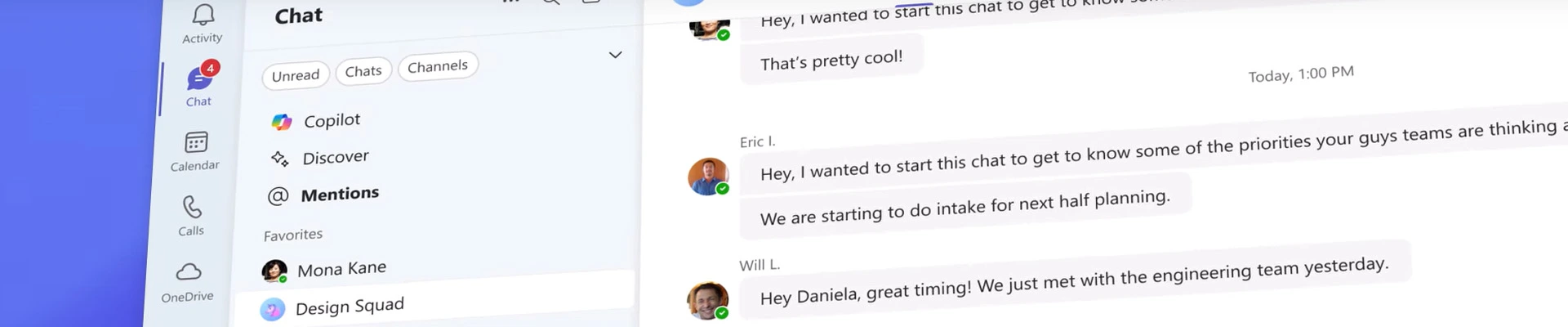
Microsoft Teams goes further in streamlining collaboration and enhancing productivity with its new chat and channels features. The update brings all your chats, teams, and channels into one place, making it easier to manage conversations and stay organised.  

How can Teams’ new features benefit your business? 

Microsoft Teams Simplifies Your Workspace 

The new Microsoft Teams features are designed to simplify your digital workspace and for more effective communication. By integrating chats, teams, and channels into a single view, conversations are easier to access, triage, and organise. You can stay on top of important messages, so nothing slips through the cracks. 

For example, a professional services firm can more easily track discussions about different client accounts. This ensures that no important messages are missed, because all conversations are in just one view. This means better coordination and timely responses to client inquiries. 

Customisable Views to Suit Your Needs 

You can choose to keep chats and channels combined or separate them based on your preferences. This flexibility ensures that you can organise your workspace in a way that works best for you. 

For example, when a construction project manager separates chats and channels by project, they can quickly access updates related to specific project sites. This improves their ability to manage multiple projects simultaneously and helps to ensure that each project stays on schedule. 

Teams’ Message Previews for Quick Access 

Message previews help you stay on top of conversations by showing a snippet of the latest messages. This makes it easier to quickly assess the importance of a message and decide whether it requires immediate attention. 

For example, your HR department can see snippets of the latest messages to quickly identify urgent issues, such as employee grievances or urgent policy updates. They can then respond promptly, enhancing overall employee satisfaction and engagement. 

Save Time & Effort with Copilot Meeting Recap 

The Microsoft Copilot meeting recap feature provides a summary of key points and action items from meetings. This ensures that you can catch up on meetings you missed and stay informed about important discussions. 

For example, a nonprofit organisation can keep track of board meetings using Copilot’s recaps. After each meeting, Copilot can provide a summary of key points and action items. The team can then review these to follow up on important decisions and maintain high levels of organisational efficiency. 

Project Management Made Easy in Microsoft Teams 

Managing multiple projects is also made effortless with Teams. You can organise chats and channels by project, so tracking progress and collaborating with team members are easier. This ensures that everyone is on the same page and that projects stay on track. This includes all team members regardless of location. 

For example, an insurance firm can organise their Teams chats and channels by policy type and client. This allows underwriters, claims adjusters, and customer service representatives to collaborate more effectively, track progress, and address issues in real-time. These can lead to more efficient policy management and better customer satisfaction. 

Improve Client Satisfaction with Dedicated Channels 

By creating dedicated channels for each client, you can ensure that all relevant information is easily accessible. You can also handle client interactions promptly and professionally. These can be crucial for businesses that rely on client interactions. 

For example, a legal firm can create dedicated channels for each client case. This ensures that all communications, documents, and updates related to a case are easily accessible to the legal team. This means quicker client enquiry responses, more efficient case management, and improved client satisfaction and retention. 


Experience Teams’ Elevated & Enhanced Features 

Because your work goes beyond the desktop, so you’ll be thrilled to experience the new chat and channels across all your devices soon. Stay connected and productive wherever you are, whether you’re on desktop, mobile, iOS, or Android. 

Microsoft also announced that Teams will become even more streamlined and user-friendly with upcoming features. You’ll see testing start this quarter, with wider testing in early 2025 and full availability expected by mid-2025. 

Level up your team’s collaboration with Microsoft Teams. Learn more about how it can benefit your business today. 

Discover Microsoft for Your Business 

Supercharge Your Team with Copilot Actions

Microsoft has unveiled exciting new features for Microsoft 365 Copilot. These include Copilot Actions, new agents, and tools designed to empower teams – transforming how organisations operate while enhancing efficiency and productivity.  

Time-Saving Automation Can Streamline Your Operations  

Copilot Actions are designed to automate everyday repetitive tasks, so your crew can spend more time on strategic initiatives. With simple, fill-in-the-blank prompts, you can set and forget tasks such as summarising daily action items, gathering inputs for weekly newsletters, or preparing for customer meetings by summarising recent interactions.  

This automation not only saves time but also ensures consistency and accuracy in routine operations. Here are some specific use cases: 

Personalised Client Communications 

Financial services rely heavily on timely and accurate communication with clients. Copilot Actions can automate the creation of personalised client updates, ensuring relevant and engaging communications. This can lead to improved client satisfaction and retention. 

Streamlined Compliance Reporting 

Compliance is critical across many industries. Copilot can assist in generating and refining compliance reports, reducing the time and effort required to meet regulatory requirements. This ensures that your organisation remains compliant at any given time. 

Improved Meeting Efficiency 

Copilot can summarise key points and action items from meetings, ensuring that nothing is missed, and follow-ups are timely. This feature is useful for keeping track of discussions and decisions made during client meetings or internal strategy sessions. 

Simplified Data Analysis & Visualisation 

Copilot can help analyse your data, providing insights for informed decision-making. Whether it’s tracking market trends or analysing client portfolios, Copilot’s data visualisation capabilities make it easier to understand and act on complex information. 


Master the Magic Behind Copilot Actions 

Here are the simple steps involved in most Copilot Actions applications:

1. Data Collection

As your access permissions allow, Copilot gathers relevant data from your systems, such as databases, transaction records, meeting notes, and other sources. Your prompt can be something like “Gather client transaction records from the past month” or “Retrieve all meeting notes from the last quarter.”

2. Content Generation

Copilot drafts the necessary content, whether it’s reports, summaries, updates, or visualisations. Use a prompt like “Draft a compliance report based on the latest audit logs” or “Create a summary of the recent client meeting.” 

3. Review and Edit

Your team reviews the generated content, making any necessary adjustments to ensure accuracy and relevance. You can still input a prompt like “Review the draft report for accuracy” or “Edit the meeting summary to include key action items.” 

4. Automated Refinement

Copilot refines the content based on feedback, incorporating any changes to ensure it meets your standards. You might use the prompt “Incorporate feedback into the compliance report” or “Refine the client update based on the latest data.” 

5. Final Approval and Distribution

Approve the finalised content for distribution to the relevant stakeholders, whether clients, regulatory bodies, or internal teams. Your prompt could be “Approve the final compliance report for submission” or “Send the updated client summary via email.” 


What You Can Get from Copilot’s New Features 

Your team can achieve tremendous benefits and make a bigger impact with the power of AI. 

Improved Productivity 

Copilot automates routine tasks, enabling your employees to focus on high-value tasks. This shift can significantly boost productivity and operational efficiency. 

Cost Efficiency 

By streamlining operations, Copilot can potentially decrease technology expenses by minimising reliance on third-party services and other AI tools. 

Enhanced Security 

The Copilot Control System can provide your IT team with the tools to manage Copilot and agents securely. This ensures that your organisation’s data is protected while leveraging the benefits of AI. 


New Copilot Agents Do Real-Time Language Interpretation and More 

Microsoft has also introduced new agents that unlock SharePoint knowledge, provide real-time language interpretation in Teams meetings, and automate employee self-service. These agents are designed to enhance collaboration and streamline workflows, making it easier for your team to access and share information. 


Copilot Studio to Manage Your Agents 

Copilot Studio allows teams to create, manage, and connect agents to Copilot. This platform provides a centralised location for developing and deploying AI solutions tailored to your organisation’s needs. 


Microsoft Copilot’s Performance Multiplied 

Microsoft has significantly improved Copilot’s performance, with responses now twice as fast and satisfaction nearly three times higher. These enhancements ensure that your team can rely on Copilot for quick and accurate assistance. 


Next Step to Innovation with Microsoft 365 Copilot 

Grab the opportunity today to enhance your IT operations with Microsoft 365 Copilot’s new features. Find out how you they can help your business.

 Microsoft Copilot & AI Powered Solutions

Catch up on Microsoft Ignite 2024

Technology often drives business success, so you need to stay ahead of the curve. That’s also why Microsoft holds the its annual event Microsoft Ignite, so business leaders can gain valuable insights into the latest tech advancements. While Microsoft Ignite 2025 is still months away, you can catch up on highly useful resources from the event.  

Watch On-Demand Videos from Microsoft Ignite 2024 

For those who were not able to attend any portion of Microsoft Ignite, there is a wealth of on-demand content. Access recordings of key sessions to stay updated on the latest trends and technologies. For example, Unlock the Value of Microsoft 365 Copilot and Copilot Studio demonstrates new capabilities and real-world examples that could help teams enhance productivity and transform business processes. Those who want to discover how to safely integrate AI and leverage it to strengthen your cyber defences can watch Security Innovation to Strengthen Cyber Defense in the Age of AI. It presents the latest security innovations to help safeguard, detect, and respond to emerging cyber threats.  


Access Curated Resources and Key Announcements 

Microsoft Ignite provides a range of business technology resources that can give you valuable insights. These include: 

  • How Toyota uses AI for powertrain development, information collection, decision-making, boosting productivity, and innovating vehicle design 
  • Top 10 Zero Trust Security Controls you can implement right away to improve your security posture, using tools you may already have 
  • Harnessing the power of data and AI in healthcare and life sciences, optimising workflows, enabling better outcomes, and adopting AI responsibly 

Catch up on news and announcements that could impact your organisation, on topics such as security innovations, AI transformation, and new IT tools. 


How Microsoft Ignite Can Drive Your Success 

Why is Microsoft Ignite important to business? How can the event’s resources help your organisation move ahead? 

Transform Your Business Through AI 

Attending the event can help you discover how AI can revolutionise your operations, from automating routine tasks to providing deep insights into your data. You could also learn about the latest in cloud technology and how it can enhance your organisation’s efficiency and scalability. 

Explore Tech Strategies, Apps, and Tools 

At Microsoft Ignite, you can explore new ways to develop and deploy applications that meet your specific needs. Topics like security in the age of AI are also discussed, where participants can understand better the best practices for protecting data and ensuring compliance in our digital world. 

Save on Resources and Operational Costs 

By adopting the latest technologies showcased at Microsoft Ignite, organisations can reduce costs. AI and cloud solutions can automate routine tasks, reduce the need for physical infrastructure, and improve resource allocation. 

Adopt Technologies That Scale with Your Business 

As your organisation grows, the technologies presented at Ignite can scale with you. Whether you’re a small nonprofit or a large healthcare provider, these solutions are designed to adapt to your evolving needs. 

Enhance Communication and Elevate Teamwork 

Tools like Microsoft Teams are highlighted at Ignite and can improve communication and collaboration within your organisation. Streamline your workflow, whether scheduling meetings, sharing documents, or coordinating projects. 


Get Future-Ready at Microsoft Ignite 2025 

Microsoft Ignite’s origins date back to 1993, when it was initially known as TechEd. The first TechEd conference was held in Orlando, Florida. The event was then rebranded in 2015 to Microsoft Ignite, marking a new era for Microsoft’s annual conference. Since then, it has provided opportunities for participants to network with industry experts and discover innovative solutions to propel their organisations forward. 

Microsoft Ignite 2025 will take place the week of November 17 in San Francisco. It promises to be a game-changer for businesses, as it will showcase the latest advancements in AI, cloud infrastructure, app innovation, and security. 

To learn more about harnessing tech innovations to move your organisation forward, schedule a free consultation with ADITS today. 

 Contact ADITS Now